
Anker Nano Power Bank 30W Review | Testing the Built-In Cable in Real Life
Anker Nano Power Bank 30W Review | Testing the Built-In Cable in Real Life
A hands-on review of the Anker Nano Power Bank (30W, Built-In USB-C Cable). We break down whether the 10,000mAh capacity, 30W output, built-in USB-C cable, and 215g weight actually hold up in daily use — with comparisons against the Anker Power Bank 30W, Zolo, and the 45W retractable-cable model.
Anker Nano Power Bank (30W, Built-In USB-C Cable): The Bottom Line
Verdict First
The Anker Nano Power Bank (30W, Built-In USB-C Cable) A1259 earns a solid 4.1 out of 5. The spec sheet reads well: 10,000mAh, up to 30W in/out, a built-in USB-C cable, and three connection points (integrated USB-C cable + USB-C port + USB-A port). That combination maps cleanly onto everyday smartphone use. If you're running an iPhone 15/16 or a USB-C Android and you've ever left your cable at home, the peace of mind alone makes this worth considering.
Who it's built for: people who carry a bag daily and want to top up a phone or tablet at 30W without fumbling for a cable. Who it's not: anyone who keeps their power bank in a front pocket and wants the lightest option possible, or someone planning to run a MacBook Air off it as a primary source. That distinction matters.
By the numbers: the A1259 measures roughly 104 × 52.3 × 26mm and weighs about 215g. In Japan, it sells for around 5,680 yen (~$38 USD) on Kakaku.com and typically hovers around 5,990 yen (~$40 USD) on Amazon.co.jp. For context, the Anker Power Bank (10,000mAh, 30W) skips the built-in cable, comes in at roughly 99 × 52 × 26mm and about 220g, and hits the same 30W output. Step up to the Anker Nano Power Bank (10,000mAh, 45W, retractable USB-C cable) and you get 45W output in exchange for a heavier, thicker body — around 230g.
The comparison is simple: want the cable included? A1259. Prefer to bring your own? The 30W non-cable model. Prioritizing a laptop? The 45W. The gap between 30W and 45W is marginal for phones, but it starts to matter when you're trying to charge a MacBook Air on the go. My take: 30W means "great for phones, emergency top-up for laptops." 45W means "laptop use is genuinely in scope."
The honest weakness of the A1259 is that 215g and 26mm thick is a lot if you care about going light. Pair it with a phone in your front pocket and you'll feel both. For bag carry, the A1259 makes a strong case — not having to pack a separate cable is a real, daily benefit. For laptop-heavy users, the 45W retractable model offers more headroom.
On price: around 5,990 yen (~$40 USD) at Amazon is "worth comparing" territory — genuinely useful, but not an obvious impulse buy. If it dips to the 4,190 yen (~$28 USD) sale price that has appeared on some storefronts, the built-in cable convenience makes the decision much easier.
Who Should Buy This
The A1259 clicks most for people who refuse to carry a separate cable. It sounds minor until it isn't — having the power bank but leaving the USB-C cable on your desk is a surprisingly common frustration. The integrated cable eliminates that entirely. Think of it like a carabiner attachment: you pull it out, plug in, done.
It also fits well for commuters and travelers who want one device to cover both a phone and a tablet. Single-port output is 30W, and simultaneous charging across all three ports drops to a combined 24W — so you won't be fast-charging three devices at once. But if you're prioritizing your phone while keeping a tablet trickling, it works. At 10,000mAh, it's practical for smartphone-centric use — roughly 1.8–2.1 charges of an iPhone 15 under real-world conditions.
The sweet spot user: iPhone 15/16 or USB-C Android, happy with 30W, moving around during the day. The 30W handles fast charging for phones without issue, and the ~1.5-hour recharge time for the bank itself is fast for this capacity class. If you're cycling through a phone, earbuds, and a tablet across the day, the balance of output, capacity, and convenience holds up.
Who Should Look Elsewhere
First cut: anyone prioritizing pocket carry and light weight. 215g isn't outrageous, but 26mm of thickness doesn't disappear in slim pants. If you want something you barely notice in your pocket, the A1259's best feature — the integrated cable — won't outweigh the bulk.
Second cut: MacBook Air as the primary goal. 30W will technically charge a USB-C laptop, but it's emergency territory, not comfortable primary use. If your laptop is the main device you're trying to power, 30W vs 45W is not a small difference. The 45W retractable model is the straighter choice — it's designed for that use case. The Anker Nano Power Bank (10,000mAh, 45W, retractable USB-C cable) is what you want there.
Third cut: people who worry about cable wear and want the option to swap cables. The built-in cable is the headline feature, but it's also permanent. If the cable degrades, you can't replace just that part. If modularity and long-term repairability matter to you, the Anker Power Bank (10,000mAh, 30W) — no built-in cable — lets you swap in a fresh cable whenever you need.
The Real Selling Point: Never Forgetting Your Cable
What the Built-In USB-C Cable Actually Does for You
If there's one reason to choose this over a comparable spec'd power bank, it's not needing to think about your cable. A power bank with great specs is useless when you're on the platform and the cable is on your kitchen counter. The A1259 has the cable attached, so the moment you pull it out of your bag, you're ready to plug in. That one less step matters more in practice than it looks on a spec sheet.
It pairs cleanly with iPhone 15/16, USB-C Androids, and USB-C tablets. With up to 30W in and out, it handles quick top-ups well — when you're running low, a short connection brings you back into safe range. 10,000mAh is a workable size for smartphone-centric days; in real-world use, figure roughly two charges of a modern flagship.
What I find most useful about the integrated cable is that it removes a whole category of forget-it-at-home risk. When you're already tracking your phone, wallet, earbuds, and keys, one fewer item to manage is genuinely helpful. The cable also doubles as a grip point — wrapping it around a finger makes the power bank easier to hold while standing on a train, and reduces the chance of dropping it.
Where It Earns Its Keep
The commute scenario is the clearest case. Battery that seemed fine at 7am has been eaten up by maps, payments, video, and music by noon. Pulling the A1259 out and plugging straight in — no unspooling a cable, no hunting for the right end — keeps the friction low. The psychological barrier to actually charging drops when there's less to do.
Travel and business trips are where it gets more compelling. The little items are always the hardest to pack efficiently, and consolidating "power bank" and "cable" into a single object is exactly the kind of simplification that compounds. In a hotel room, at an airport gate, on the shinkansen — "where did I put the cable?" stops being a question. The A1259's USB-C port and USB-A port mean you can still plug in external cables when you need to, but the built-in one handles most of the work.
Short charging windows — boarding gates, transfer gaps, a twenty-minute cafe stop — are also a strength. You're not chasing a full charge; you want 20–30% back fast. Speed of connection matters more than raw capacity in those moments, and the A1259 is optimized for exactly that.
The Tradeoffs: Cable Durability and Handling
The integrated cable brings real convenience, but it's not without structural risk. The most important caveat: this product is not designed with cable replacement in mind. A replaceable cable is cheap to fix when it wears out. A built-in one is not. Hard pulls, sharp bends under load, hanging the power bank by the cable while connected — those are the kinds of habits to break if you want it to last.
Worth flagging: Anker does not publish a rated bend cycle count for the A1259's cable. Some Anker products include that kind of data; this 30W model doesn't, at least not in documentation I could verify. That doesn't mean the cable is fragile or particularly durable — it means there's no number to hang certainty on. Convenient cable does not automatically mean indestructible cable.
From a handling standpoint, the one-piece form has limits. The cable length is fixed, so if you prefer to charge a device on a desk with a longer run of cable, this isn't that. And at roughly 215g, holding the power bank while it's connected to your phone is stable rather than weightless. My instinct: bag carry brings out the best in this product. Pocket carry does not.
ℹ️ Note
The value of the A1259 is less about the "30W" spec and more about never leaving your cable behind. But that convenience depends entirely on the built-in cable staying in working shape. If you prioritize convenience now and can accept some long-term uncertainty, this design suits you well. If you want full control over every component, a detachable-cable model is the more maintainable choice.
Performance and Specs: What 30W Actually Gets You
Port Layout and Single-Port Output
The A1259's port setup is easy to map out: built-in USB-C cable, USB-C port, and USB-A port — three connection points total. The idea is straightforward: plug your phone into the integrated cable, run external devices through the other ports as needed.
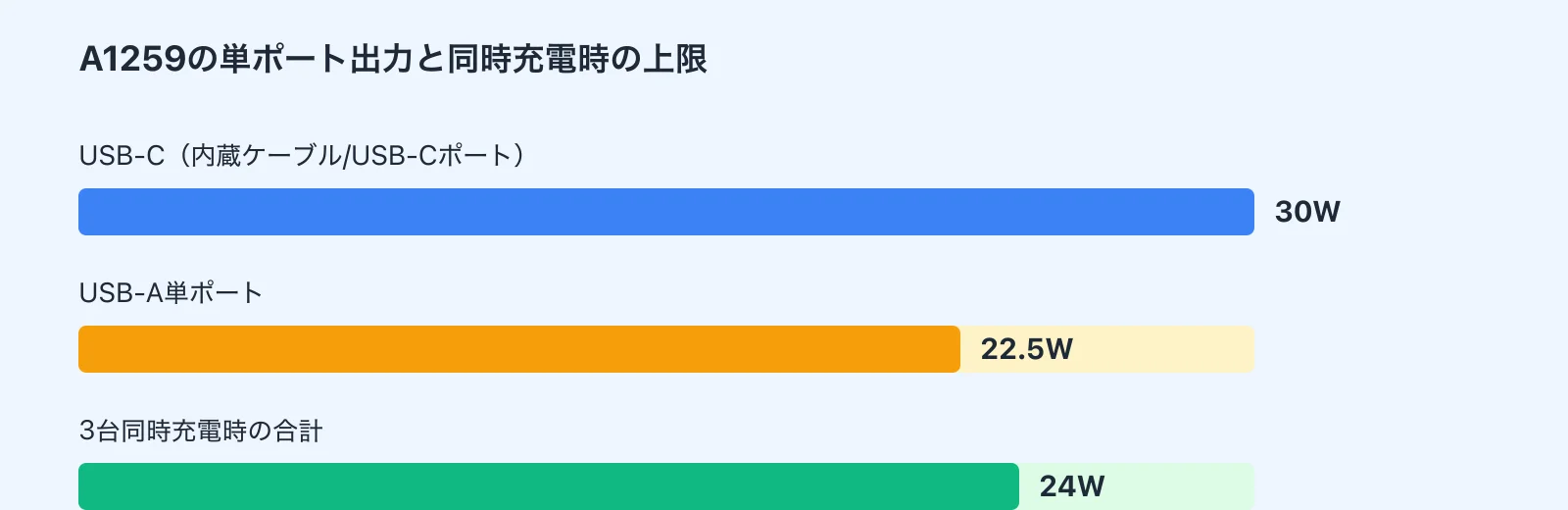
Single-port performance centers on the USB-C side supporting up to 30W input and output. The supported voltage/current combinations are 5V/3A, 9V/3A, 15V/2A, and 20V/1.5A — the last of which technically puts some lightweight USB-C laptops within range. The USB-A port peaks at 22.5W solo, which is quick enough for phones and accessories.
USB Power Delivery (PD) is what makes the USB-C side fast. It's the spec that lets a USB-C charger negotiate higher voltages with a compatible device, cutting charge times significantly compared to the old 5W baseline. The A1259's 30W PD support extends its useful range from phones to tablets and some entry-level laptops.
Which Devices Are Realistically Supported
The A1259 is most at home with iPhone 15/16, USB-C Android phones, and iPad mini/iPad Air class tablets. Those are the devices that benefit most from 30W — faster top-ups on the go, minimal wait. For phone-centric use, "fast" isn't just theoretical; it's tangible.
Laptops need a more careful framing. A MacBook Air will charge from the A1259, but the role is emergency, not primary. Light tasks — email, browsing, document editing — can work with this power bank as a supplemental source, but it's not comfortable primary power for a laptop. The distinction between "it charges" and "it charges well enough to be useful" matters here.
Under heavy processing load — video export, rendering — 30W is more "limiting the drain rate" than "actively charging." The MacBook Air isn't unusable, but you're extending battery life rather than replenishing it. If the laptop is the centerpiece of your kit, 45W and above is the right bracket. The A1259 is properly understood as a phone-and-tablet device that can reach a lightweight laptop in a pinch.
Recharge Time and Multi-Device Limits
The bank itself accepts 30W input, and Anker rates the recharge time at approximately 1.5 hours. For 10,000mAh, that's genuinely fast — 37Wh of capacity at 30W input makes the math coherent. It means a morning charge-up before heading out is realistic even if you forgot overnight.
Some retail listings mention "50% in 45 minutes." That claim doesn't appear in Anker's official Japanese documentation, so treat it as a vendor-supplied data point rather than confirmed spec. Battery charging is typically faster in the first half anyway, so the statement is plausible — just not one I can confirm against primary sources.
The hard constraint to know: simultaneous use across all three ports caps combined output at 24W. A single USB-C port gives you the full 30W; connecting a phone, tablet, and earbuds at the same time shares a 24W budget across all three. That's not a dealbreaker, but it reframes what this product is — a thoughtful sequential charger, not a multi-device speed station. In practice: prioritize your phone first, then let the other devices trickle.
ℹ️ Note
Single device, 30W — clean and quick. Three devices simultaneously, combined 24W — you're distributing power, not delivering full speed to everyone. For solo smartphone charging, the A1259 is notably capable. For charging a family's devices at once, it's the wrong tool.
On Real-World Output Measurements
Independent measured data specifically for the A1259 is sparse. The 30W spec is clear from official documentation, but confirming "how many watts it actually delivered in a benchmark" for this exact unit is difficult — there isn't a deep pool of third-party test data to draw from.
The practical proxy: a review of the Anker Power Bank (10,000mAh, 30W) — the same capacity class, different form factor — measured a peak of 27.05W under test conditions. A 30W-rated device landing in the high-20s in measured output is common; nominal ratings and actual delivery are rarely identical.
That 27.05W figure is not the A1259's confirmed output. Different internal design, different cable configuration. But knowing a comparable Anker 30W unit in the same class measured there gives useful context. My approach: use the official spec to understand compatibility range, use measured data from similar products to calibrate expectations. For the A1259 specifically, expect strong phone and tablet performance; treat laptop use as supplemental.
For more detail, see "Anker Nano 30W 10,000mAh Review."
Real-World Pros and Friction Points
Compact But Not Slim — The Daily Carry Reality
Carried daily, the A1259's dimensions are a study in "small footprint, surprising thickness." At roughly 104 × 52.3 × 26mm, it fits cleanly in a gadget pouch or a small bag pocket without taking over. The footprint is modest. But 26mm of depth means this doesn't feel like a flat slab — it's more of a compact brick, and your hand registers the difference immediately.
Weight compounds that. 215g is close to the weight of a modern flagship smartphone. In a bag, that's fine — you won't notice it mixed in with other gear. In a front trouser pocket alongside your phone, you will notice it. The combined pull while walking is real. My read: the A1259 earns its keep as a bag-carry device. It's not a pockets-only, forget-it's-there kind of product.
Three situations highlight the contrast clearly. On the morning commute, pulling it out of a bag and snapping it onto your phone is quick and low-friction — that's where the integrated cable shines. At a desk at work or university, the all-in-one form means no cable clutter on the table. But during a quick lunch run to a convenience store, where you'd ideally pocket everything and go — the weight and thickness become the first thing you notice, not the convenience.

Travel and Business Trips: This Is Where It Clicks
The longer you're out, the more the A1259 justifies itself. On a business trip or extended travel day, managing a power bank and a USB-C cable as two separate objects gets old fast. The A1259 cuts that to one object. At the hotel, the airport gate, the train platform — "where's the cable?" is no longer a question you ask.
It pairs particularly well for people carrying a phone, true wireless earbuds, and a secondary device. You charge the phone first via the built-in cable, route the secondary device through the USB-C port, and keep things orderly. A one-night business trip with smartphone-centric use is squarely within the A1259's range — 10,000mAh is enough to feel covered without stressing about rationing.
The 24W combined limit matters more on travel days. Phone, tablet, earbuds simultaneously means splitting the budget. The practical workaround: sequence rather than parallel. Charge the phone first, then the earbuds, then the tablet. That's not a flaw — it's just the operating model. The A1259 earns its travel reputation not from "charge everything at once" but from "always ready, always connected, fewer things to track."
The Display: More Useful Than It Sounds
LED indicator dots tell you roughly how much charge is left — which is fine, but they don't give you much to work with when planning ahead. The A1259's display gives you enough information to make an actual decision: whether you have enough to last the commute home, whether to plug the bank in overnight, whether the current charge is worth using yet.
That read-at-a-glance clarity is most useful when you're making quick calls repeatedly — before leaving for the office, at midday when you're considering a top-up, at the hotel before packing up. Rather than guessing from dot patterns, you get actionable information fast.
I've used enough power banks to notice that this kind of display isn't an advanced-user feature — it pays off most for people newer to managing portable power. "Do I have enough left?" is a question with a real answer rather than an approximation. Combined with the built-in cable, it's one of the quieter but meaningful reasons the daily experience with this product is cleaner than the spec sheet suggests.
Capacity and Charge Counts: Setting Realistic Expectations
10,000mAh Is Not 10,000mAh Available to Your Phone
The 10,000mAh rating is the nominal capacity of the internal cell — not what reaches your phone. The distinction matters and is worth understanding once.
Internal battery cells operate at a different voltage than the USB output your phone expects. The power bank converts between those voltages, and that conversion loses energy. Add cable resistance and charging controller overhead, and the output is always less than the nominal capacity.
A practical rule of thumb: expect roughly 60% of the rated capacity to reach your device. Actual figures vary by product and conditions, but 10,000mAh on paper translates to something closer to 6,000mAh usable in practice. Calibrate expectations to the lower number and you won't be disappointed.

"Charges an iPhone Twice" — Read the Fine Print
Marketing language around charge counts ("charges your iPhone 2x!") isn't wrong in direction, but takes it as a fixed number and it will mislead you. The count depends on starting battery level, ambient temperature, the specific phone model, and whether you're doing a slow overnight charge or a rushed top-up.
Some retail listings for the A1259 cite "50% on an iPhone 14 in 30 minutes." That's a reasonable approximation under the right conditions — low starting charge, ambient temperature, 30W available — but strip the context and the number floats free of reality.
My mental model: skip "how many times" and think instead about "does this get me through the day safely?" For smartphone-centric use, 10,000mAh is a realistic daily safety net. Don't expect the label to hold under every possible usage pattern — it doesn't.
ℹ️ Note
"About 2 charges" isn't dishonest, but it assumes ideal conditions. Better framing: this is enough capacity to get through a full day and into the next morning without worrying about your phone dying. That use case it handles well.
Third-Party Measured Data as Reference
A1259-specific real-world capacity measurements are thin on the ground. The closest reference point is the Anker Power Bank (10,000mAh, 30W) review on my-best.com, where the tested usable capacity came in at 5,803mAh.
That figure belongs to a different product. The A1259's internal design, cable configuration, and controller behavior may differ. But seeing a comparable 10,000mAh/30W Anker product land just under 6,000mAh in real-world testing gives useful ballpark context.
For a broader framework on matching capacity to use case — what size battery covers what kind of day — a category guide like a smartwatch comparison guide applies the same logic: match the spec to the job rather than chasing the biggest number.
For more, see "Anker Nano Power Bank 30W Review | Built-In Cable and 10,000mAh Tested."
Safety and Build Quality: PSE Compliance and Thermal Management
What's Verifiable on Safety
For a product that goes in your bag every day and charges while you're on the move, safety matters more than it might seem on the spec sheet. On the A1259, the first thing to verify is PSE compliance marking for the Japanese market — the baseline regulatory certification required for domestic distribution. It's a floor, not a ceiling, but it's a meaningful one.
On the charging management side, Anker's PowerIQ technology is worth understanding. It's a system that reads what device is connected and adjusts output voltage and current accordingly. The effect: compatible devices don't get pushed harder than they need to be, which works against overcharging and unnecessary heat generation in regular use. It's background infrastructure, not a headline feature — but it's part of why Anker products behave predictably across different devices.
For thermal management, the A1259 should be understood as having protective circuitry that monitors temperature and adjusts output. Fast charging generates heat — that's physics — and how a product handles that heat determines its long-term behavior. The relevant question isn't "does it get warm?" (it will) but "does it have a mechanism to prevent runaway heat?" From what's documented, it does.

ActiveShield: Be Careful with Brand-Level Claims
Anker's Nano-series chargers and some power banks reference ActiveShield or ActiveShield 2.0 — their branded thermal monitoring and protection technology. The underlying function (temperature monitoring, output control) is real and documented for Anker products broadly. But for the A1259 specifically, I cannot confirm which version of ActiveShield is implemented, and the product's own documentation doesn't make that explicit.
The right approach: describe what's verifiable — "temperature monitoring," "protective circuitry," "thermal management" — rather than attributing a specific ActiveShield version. This might seem like a minor distinction, but safety claims benefit from precision. The A1259 carries Anker's safety philosophy; which specific branded feature version is installed in this exact unit is harder to pin down.
My rule with this kind of product: the more a safety feature sounds impressive, the more carefully I read model-specific documentation. "Anker builds safe products" and "this specific model has ActiveShield 2.0" are different claims. I'll stand behind the first; the second requires documentation I haven't found for the A1259.
ℹ️ Note
This section sticks to verifiable facts. Series-wide feature names are referenced as context only. On safety topics specifically, it's better to slightly understate than to overgeneralize — narrower claims are more trustworthy.
Storage and Usage Notes
Even with solid protection circuitry, user behavior affects longevity. The main thing to avoid: leaving the power bank in high-temperature environments. A car interior on a hot summer day, a sun-exposed windowsill, a closed bag in a warm room — all of these raise internal battery temperature. Fast-charging products already generate heat during use; compounding that with poor storage conditions accelerates degradation.
In active use, keeping the bank buried in a stuffed bag while charging your phone is worth avoiding too. The A1259's integrated cable makes it tempting to just leave it connected in the bottom of your bag while you're on a crowded train. But if the power bank can't dissipate heat — covered by fabric, squeezed against other objects — it runs warmer than it needs to. Think of it as a tool that needs airflow to work at its best.
For long-term storage, keep some charge in the battery rather than storing it fully depleted or completely full. An occasional top-up check every month or two is enough. For accessories that pair well with a power bank like this — compact chargers, quality cables — see the USB-C charger comparison guide for 2025 on this site.
Head-to-Head: Anker Power Bank 30W vs. Zolo vs. Nano 45W
The Comparison Table
The A1259's position in the lineup becomes clearer with direct comparison. The competitive question is simple: prioritize the built-in cable, prefer the modular approach, or need the extra headroom for a laptop? The A1259 answers the first. The others answer the rest.
| Model | Capacity | Max Output | Built-In Cable | Ports | Weight | Thickness | Multi-Port Limit | Price | Best For |
|---|---|---|---|---|---|---|---|---|---|
| Anker Nano Power Bank (30W, Built-In USB-C Cable) A1259 | 10,000mAh | 30W | Yes (integrated USB-C) | Built-in USB-C + USB-C + USB-A | ~215g | ~26mm | 24W total across 3 ports | ~5,990 yen (~$40 USD) on Amazon.co.jp, ~5,680 yen (~$38 USD) on Kakaku.com | People who don't want to carry a separate cable |
| Anker Power Bank (10,000mAh, 30W) | 10,000mAh | 30W | No | USB-C × 2 + USB-A × 1 | ~220g | ~26mm | 24W total across 3 ports | ~5,990 yen (~$40 USD) | People who want to pick their own cable |
| Anker Zolo Power Bank (10,000mAh, 30W, Built-In USB-C Cable) | 10,000mAh | 30W | Yes (integrated USB-C) | Integrated USB-C included | Not disclosed | Not disclosed | Not disclosed | Available on Amazon.co.jp | Budget-conscious buyers who still want an integrated cable |
| Anker Nano Power Bank (10,000mAh, 45W, Retractable USB-C Cable) | 10,000mAh | 45W | Yes (retractable USB-C) | Retractable USB-C + USB-C + USB-A | ~230g | Thicker | Output limited with multiple devices | Varies by retailer | Users who want to charge a laptop too |
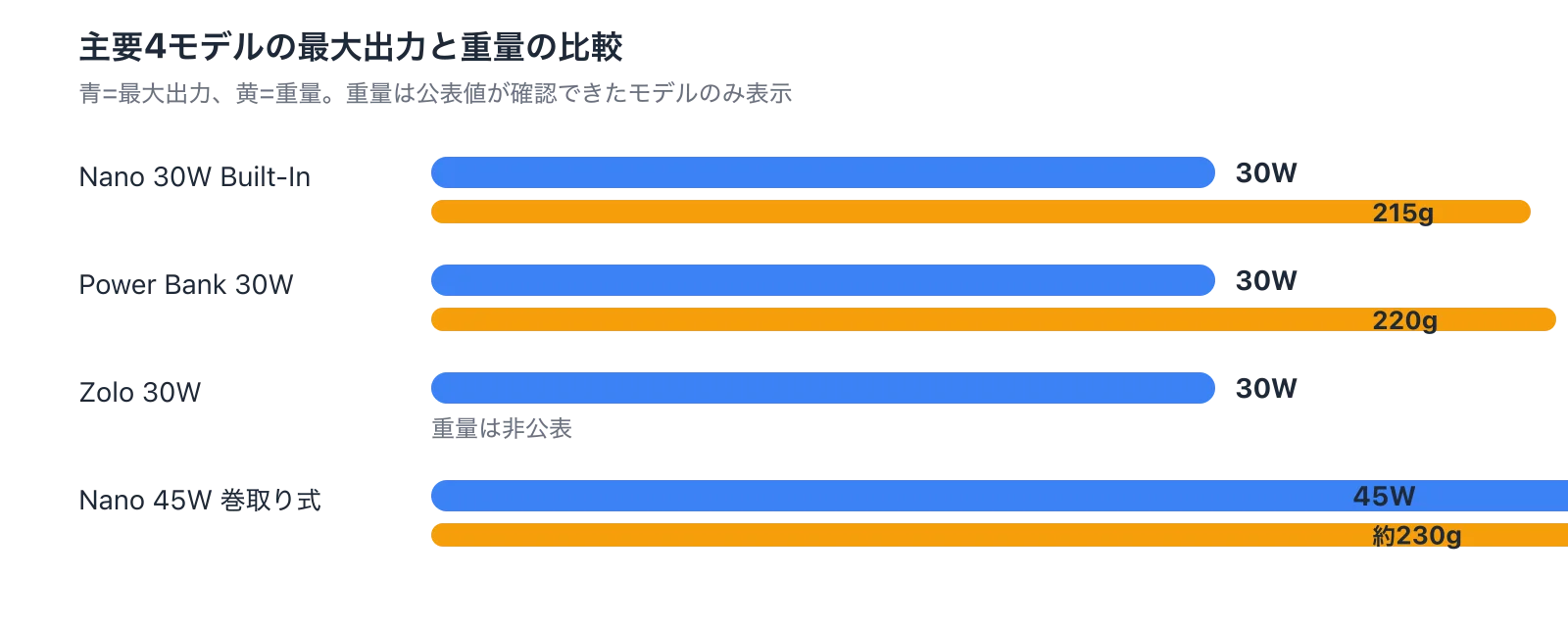
Putting the A1259's specs in practical terms: single USB-C port up to 30W including 20V/1.5A, so phones, tablets, and lighter USB-C devices are all within range. 30W input recharges the bank itself in about 1.5 hours — a meaningful advantage for daily use. Three-port simultaneous use caps at 24W combined, so it works best as a sequential charger rather than a parallel speed station.
Which One for Daily Carry?
For day-in, day-out use, the answer is direct: if forgetting your cable is a recurring problem, the A1259 is the obvious pick. Pull it out of your bag, plug into your iPhone 15 or USB-C Android, done. The "great power bank, forgot the cable" failure mode doesn't exist with this product, and that matters more than most spec comparisons.
The tradeoff is that 215g and 26mm don't disappear in a front pocket. This isn't a slip-it-in-anywhere device. For comparison: the Anker Power Bank (10,000mAh, 30W) drops the integrated cable but gains port flexibility — two USB-C ports means you can run different cable lengths, use a laptop cable you already own, and adapt to different situations. If you're already carrying a gadget pouch, the modularity is worth having.
The Anker Zolo Power Bank (10,000mAh, 30W, Built-In USB-C Cable) enters the picture for price-sensitive buyers who still want the integrated cable experience. It's a 30W class product in roughly the same category, and if cost is the lead criterion, it's worth a look. The spec transparency isn't as clear, but the "one object, cable included" convenience is there.
Bottom line for daily carry: the A1259 is for people who will pay for the convenience of not tracking a separate cable. It's not the lightest; it's the most ready to go.
Which One for Laptop Charging?
If charging a laptop is a genuine goal — not just "technically possible" but "I want this to be part of how I use my laptop on the go" — the Anker Nano Power Bank (10,000mAh, 45W, retractable USB-C cable) has the clearer advantage.
The A1259 will connect to a MacBook Air. The 30W single-port output includes 20V/1.5A, so it's within spec. But the role is supplemental, not primary. Short cafe sessions where you need to extend runtime by an hour or two? Viable. Running a MacBook Air as your main work machine with this as the power source? You'll feel the limits. The combination of 30W and 10,000mAh just doesn't have the headroom.
The 45W model extends that headroom. But it costs you: roughly 230g and a bulkier form factor than the A1259. The retractable cable is convenient, but the overall package is heavier and thicker. If your daily kit is smartphone-first with occasional tablet use, 30W is plenty. If a USB-C laptop is central to your workflow and you need reliable top-ups on the road, the 45W is the more logical choice.
The cut is clean: phone and tablet focus → 30W. Laptop focus → 45W and above. The A1259 occupies the former category with confidence.
Upgrading from a 22.5W Model: Is It Worth It?
The answer depends on whether you're thinking about this as a pure speed upgrade or a broader capability shift. For phone-only use, the jump from 22.5W to 30W won't feel dramatic. Daily commute charging, quick top-ups, earbuds and accessories — the experiential gap is small.
Where it becomes meaningful: if your carry kit is now USB-C-centric. The A1259's 30W USB-C single-port output — including 20V/1.5A — brings iPads and lighter USB-C laptops into play, not just phones. The ~1.5-hour bank recharge time also beats most 22.5W-era products. The upgrade isn't "a bit faster" — it's "more devices covered."
The other upgrade driver is the integrated cable itself, independent of wattage. If your 22.5W model works fine spec-wise but you're tired of remembering to pack a cable, the A1259 addresses that without requiring you to care about the output difference. Conversely, if you already carry a quality USB-C cable and value the freedom to swap, the Anker Power Bank (10,000mAh, 30W) — no built-in cable — might be the cleaner upgrade path.
The upgrade summary: phone-only with a 22.5W model and no cable frustration? No urgent reason to switch. USB-C device ecosystem and tired of the cable dance? 30W with integrated cable makes sense. The A1259 is a watt-and-convenience upgrade together; you're really buying both.
Pros and Cons
The Case For It
The A1259's strengths come into focus when you frame the question as "how well does this serve smartphone-centric daily carry?" The spec sheet looks straightforward; the day-to-day advantages are sharper.
- Built-in USB-C cable removes cable management from the equation
The A1259's clearest differentiator. Grab it from your bag and plug in — no hunting for the right cable, no untangling, no "I thought I packed it." iPhone 15/16 and USB-C Android users get the most benefit.
- 30W output handles phones and tablets without issue
Comfortable for smartphone fast charging; capable for USB-C tablet top-ups. Not a high-output laptop charger, but for its intended use case — phones and tablets on the go — 30W is well-matched.
- ~1.5-hour bank recharge keeps the rotation tight
Fast for this capacity class. Plugging it in while you get ready in the morning means you can take it out with a full charge. Doesn't drag across multiple days if you use it heavily.
- Display makes capacity actually readable
More useful than an LED dot array. "How much is left?" has a real answer before you leave the house, not a vague glow to interpret.
- Three connection points cover mixed-cable situations
Built-in USB-C cable plus a USB-C port plus a USB-A port. USB-C-only kits and legacy USB-A accessories can both be served. Phones, earbuds, small gadgets — the layout handles the combination.
- Real-world capacity is practical for a smartphone day
Roughly 1.8–2.1 charges of an iPhone 15 under realistic conditions. A day-long insurance policy for battery anxiety, sized right for a bag that isn't trying to hold a laptop charger too.
The Friction Points
Nothing about the A1259 is a dealbreaker unless it hits specifically what you need. But the limitations are honest and predictable.
- 215g is noticeable in a front pocket
Fine in a bag. In a pocket with your phone, both objects are present and the combined weight shows while walking. Not extreme, but not invisible either.
- 26mm thick means it doesn't read as slim
The footprint is compact; the depth isn't. It sits in your hand more like a small block than a flat card. Thinner-profile alternatives exist if that matters to you.
- Three ports simultaneously drops to 24W combined
Single-device charging at 30W is the strong mode. Add more devices and the budget gets split. Simultaneous fast charging across all three ports isn't what this is designed for.
- MacBook Air charging is supplemental, not primary
USB-C laptop charging is technically within spec, but the experience is "extending battery life" rather than "charging the laptop." Laptop-primary users need more wattage and more capacity.
- Integrated cable cannot be replaced
The convenience cuts both ways. If the cable wears out, the whole unit is affected. People who prefer modular setups — swap the cable when it ages — won't find that option here.
- Full retail price (~5,990 yen / ~$40 USD) is a comparison price, not a buy-on-sight price
At 4,190 yen (~$28 USD) on sale, the value proposition gets much cleaner. At close to 6,000 yen, it's "definitely worth considering" rather than "easy yes." The product's appeal is meaningfully price-sensitive.
Price and Upgrade Timing
Pricing Snapshot
Pricing is straightforward to read. On Amazon.co.jp, the standard range is around 5,990 yen (~$40 USD). A sale price of 4,190 yen (~$28 USD) has appeared on at least one major Japanese retail site. The difference between those two numbers materially changes how competitive the A1259 looks.
To translate into concrete guidance: at 5,990 yen (~$40 USD), it's worth comparing seriously but isn't an obvious impulse buy. At below 5,000 yen (~$33 USD), the case becomes much cleaner. The editorial read: once this product dips under 5,000 yen, the integrated cable advantage is adequately priced against the modular 30W alternatives. Above that, the premium for the built-in cable requires a deliberate decision.
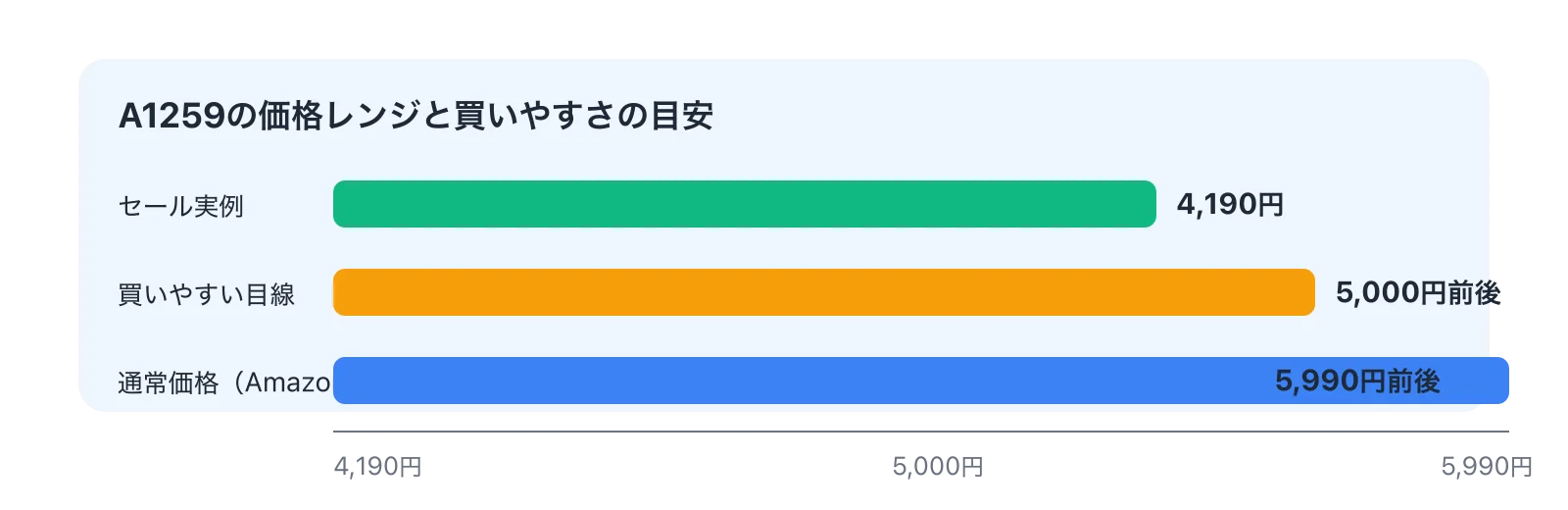
My view: at around 5,000 yen (~$33 USD), I'd recommend it without hesitation. The cable-included convenience earns its price premium over detachable-cable 30W models at that level, and the value case is easy to articulate. Close to 6,000 yen, I'd say: "genuinely useful, but take a day to think about it." The product itself doesn't change — the math around the price premium does.
Who the Price Makes Sense For
Whether the A1259 represents good value comes down to one question more than any other: how much is a built-in cable worth to you specifically? If you're the kind of person who commutes with a bag, frequently plugs in at cafes and airports, and has had the "great power bank, forgot the cable" experience more than once — the premium is justified. A power bank's value is realized at the moment you need it. Needing it and not being able to use it costs more than the cable premium.
For context: a modular cable setup offers more flexibility, but it also means managing two items instead of one. If that friction is real and regular, the A1259's price difference from a detachable-cable model is recoverable in daily convenience, even if you can't put a dollar figure on it.
For people who already carry a quality cable everywhere and have a system that works, the Anker Power Bank (10,000mAh, 30W) is a strong alternative at similar pricing. Same core spec, more port flexibility, and no integrated cable to factor in. The A1259 is not a good-value buy because it's cheap — it's a good-value buy when the cable-included experience genuinely changes your daily routine.
Light users — someone who carries a power bank a few times a month — won't extract enough benefit to justify the premium at 5,990 yen (~$40 USD). Frequent daily users will. The product earns its price in frequency of use.
When to Upgrade
Coming from a 22.5W model or a USB-A-centric setup, the A1259 is a meaningful step up — not just in wattage, but in compatibility with current USB-C devices. iPhone 15/16 and USB-C Android users especially will notice the difference in how well the power bank talks to their ecosystem. It's not a marginal spec bump; it's the device meeting you where modern devices actually are.
Coming from a 30W detachable-cable power bank you're happy with, the upgrade rationale narrows significantly. The charging core is similar. What you'd gain is the integrated cable; what you'd give up is the ability to swap cables. If "I keep forgetting my cable" describes you, upgrade. If "I always have a cable with me already," there's no urgent reason.
The pivot question: is "no separate cable" a convenience, or is it a problem you'd actually pay to solve? If it's the latter, the A1259 is a logical upgrade candidate. If it's the former, stay with what works.
Summary: upgrading from 22.5W → likely satisfied. Upgrading from 30W detachable → only if the cable integration is the actual pain point. Price judgment: at or below 5,000 yen (~$33 USD), the convenience case closes easily. Above that, the buy is more considered.
Final Take: Who Should Buy It, Who Shouldn't
The Right Buyer
The A1259 is cleanly positioned for people who want a built-in cable without sacrificing output or capacity — and who use their power bank most days. The short version of this whole review: if you want a power bank that's "always ready without thinking about it," this is a strong answer.
Specifically: daily commuters who want quick top-ups without cable hassle. The station, the train, the coffee break — pulling the power bank out and being instantly connected is the use case this was built for. If the speed of reaching for a cable feels like friction (and it does for many people), the A1259 removes it.
Also: business travelers and weekend trippers who want fewer items to track. Power bank and USB-C cable as a single object simplifies a small but recurring logistical problem. One-night trips with phone-primary use are well within range.
And: iPhone 15/16 and USB-C Android users operating at 30W. The ecosystem fit is direct. The power bank speaks the same language as the device, and there's no conversion layer of adapters or protocol mismatches to worry about. For someone in this setup who also likes watching how much charge is left at a glance — the display adds real value on top.
Who Should Keep Looking
The mismatches are equally clear. If light weight is the top criterion — 150g range — this isn't it. Pocket carry enthusiasts who want to forget the power bank is there will feel both the 215g and the 26mm depth. The A1259's advantage doesn't help people who need something closer to invisible.
Laptop users who want meaningful charging. The supplemental framing isn't a workaround — it's genuinely what 30W and 10,000mAh offers for a MacBook Air. If the laptop is your primary device on the go, invest in higher output.
People who want cable flexibility. A detachable cable means you can upgrade, replace, or specialize. The A1259's integrated cable can't be swapped. The Anker Power Bank (10,000mAh, 30W) offers that modularity at equivalent output. If construction longevity and component independence matter more than plug-and-go convenience, the modular route is cleaner.
And price-sensitive buyers waiting for the best deal — this product doesn't perform best at its full retail price. At 4,000–5,000 yen (~$27–$33 USD), it's a straightforward recommendation. Above that, the value requires more deliberate justification.
Final Score
4.1 out of 5. The built-in cable is genuinely useful, and the output/capacity balance suits its intended use case well. The deduction is honest: 215g and 26mm make this a bag device, not a pocket device, and that limits who can fully take advantage of what it offers. Not a flaw in the product — a constraint of the design tradeoff.
Three questions to answer before buying: Do you actually want an integrated cable? Can you accept 215g in your bag? Is this primarily for your phone and tablet, not your laptop? If all three are yes without hesitation, the A1259 is a product you'll use every day and not regret.
For more, see "Anker Prime 27,650mAh 250W Review: Testing 140W Output and 665g in Real Life."
Related Articles
Anker Prime 27650mAh 250W Review: Testing the 140W Output and 665g Weight
Anker Prime 27650mAh 250W Review: Testing the 140W Output and 665g Weight
Can the Anker Prime Power Bank (27650mAh, 250W) actually charge a laptop on the go? We break down the 140W output, 99.54Wh capacity, ~665g weight, and 24,990 yen (~$167 USD) price tag with real-world data to help you decide.
Anker Nano Power Bank 30W Review: Built-In Cable Meets 10,000mAh
Anker Nano Power Bank 30W Review: Built-In Cable Meets 10,000mAh
A practical review of the Anker Nano Power Bank (30W, Built-In USB-C Cable). We cover real-world performance across 10,000mAh capacity, ~215g weight, the built-in USB-C cable experience, 30W charging, no pass-through support, and how it stacks up against the competition — so you can decide if it's right for you.
How to Choose a USB-C Cable: Charging, Data Transfer, and Video Output Explained
How to Choose a USB-C Cable: Charging, Data Transfer, and Video Output Explained
USB-C cables all look the same, but what's inside is a completely different story. You can charge a laptop fine but photo transfers crawl, or you plug into a monitor and get nothing — most of these headaches disappear once you realize that higher wattage does NOT mean faster data transfer.
How to Choose a Laptop Charger | Finding the Right Wattage in 3 Steps
How to Choose a Laptop Charger | Finding the Right Wattage in 3 Steps
USB-C laptop chargers all look the same at a glance, but the real question isn't about the connector — it's about how many watts your laptop actually needs. Get that wrong and you're stuck with slow charging, a battery that drains mid-session, or a charger that doesn't work at all.