
Anker Nano Power Bank 30W Review: Built-In Cable Meets 10,000mAh
Anker Nano Power Bank 30W Review: Built-In Cable Meets 10,000mAh
A practical review of the Anker Nano Power Bank (30W, Built-In USB-C Cable). We cover real-world performance across 10,000mAh capacity, ~215g weight, the built-in USB-C cable experience, 30W charging, no pass-through support, and how it stacks up against the competition — so you can decide if it's right for you.
The Verdict on the Anker Nano Power Bank 30W
The short version: the Anker Nano Power Bank (30W, Built-In USB-C Cable) is one of the best 10,000mAh power banks you can buy for everyday carry — it nails the sweet spot between cable-free convenience and genuine charging muscle. It's listed at 5,990 yen (~$42 USD) on the official Anker Japan site. The combination of 30W output, a built-in USB-C cable, and a percentage display makes it genuinely useful, not just spec-sheet impressive. That said, its ~215g weight and lack of pass-through charging are real drawbacks that keep it from a perfect score.
Quick Reference
| Item | Details |
|---|---|
| Full Name | Anker Nano Power Bank (30W, Built-In USB-C Cable) |
| Price | 5,990 yen (~$42 USD) |
| Overall Rating | 4.1 / 5.0 |
| Why | 30W output, built-in cable, and a display are all executed well — but ~215g and no pass-through hold it back |
| Great For | Daily commuters, travelers, iPhone 15/16 and Android users who want one less cable to carry |
| Not For | People who prioritize one-handed use, minimum weight, or want a charger-battery combo |
Pros and Cons Up Front
Pros
- Built-in USB-C cable means one less thing to forget
- 30W max output handles smartphones and tablets comfortably
- The display makes it easy to know exactly how much juice is left
Cons
- At ~215g, it's not in the ultralight category for a 10,000mAh bank
- No pass-through charging
- Using it one-handed while plugged into your phone puts strain on the cable connector
My rating is 4.1 out of 5. The reasoning is straightforward: the balance between portability and charging performance is genuinely good. For a 10,000mAh bank, supporting 30W output while also charging itself via the same built-in USB-C cable is a smart design. The display adds real utility over a basic 4-LED indicator — knowing roughly how much capacity remains changes how you use the thing. Numerically, 10,000mAh works out to around 37Wh in theory; factoring in real-world efficiency, you're looking at roughly 1.8 to 2 full phone charges. That's a comfortable amount for a daily commute, a school day, or an overnight trip.
The flip side: this isn't the bank for someone chasing minimum weight. It fits in a pocket, but at ~215g you'll feel it alongside your phone. One-handed use while it's dangling from your phone's USB-C port doesn't feel great either. And if you were hoping to plug it into a wall outlet and simultaneously charge your phone — that's not on the table here.
To put it plainly:
- Worth buying if: you commute, travel, or use an iPhone 15/16 or USB-C Android and want to reduce the cables you carry
- Skip it if: you need true one-handed convenience, lightest-possible weight, or charger-plus-battery versatility
- On the 30W output: more than enough for phones and tablets; treat MacBook Air charging as an emergency top-up, not a primary power source
MacBook Air compatibility exists, but managing expectations matters here. 30W is enough to slow a battery drain or add a few percentage points during light use. For long café sessions or sustained work, this isn't a substitute for a wall charger. Think of it as a mobile safety net during transit, not a laptop power station.
How It Compares to Similar Anker Models
Anker Power Bank (10000mAh, 30W) shares the same capacity and wattage, but the philosophy is different. That model skips the built-in cable in exchange for multiple USB-C ports and full cable flexibility. If you like choosing your own cables or need to charge two USB-C devices simultaneously, that one makes more sense. The Nano here wins on grab-and-go simplicity; the standard Power Bank wins on versatility.
Anker Nano Power Bank (22.5W, Built-In USB-C Connector) is a different category entirely — it's a 5,000mAh direct-plug model built for people who prioritize pocketability above everything else. It's great as an emergency backup, but for all-day coverage the 10,000mAh Nano has a clear edge. Pocket-first lightweight → 22.5W connector model; reliable daily driver → this 30W 10,000mAh.
Anker Nano Power Bank (20000mAh, 30W, Built-In USB-C Cable) doubles the capacity and is the better pick for multi-day trips or charging a laptop alongside your phone. The trade-off is bulk and weight that make it less appealing for everyday carry. For daily use, the 10,000mAh version wins on practicality; for longer trips or multiple devices, step up to the 20,000mAh.
💡 Tip
If you're picking just one: this bank is the best-balanced option for smartphone-focused users. Want the lightest possible? Go 22.5W. Need more output flexibility? The standard Anker Power Bank (10000mAh, 30W). Planning multi-day trips? The 20,000mAh variant makes more sense.
Bottom line from my perspective: the Anker Nano Power Bank (30W, Built-In USB-C Cable) fits iPhone 15/16 or USB-C Android users who want one fewer cable rattling around their bag. It's built around real-world mobility — not just benchmark specs. Not a perfect 5/5, but it's a power bank with a clear, defensible reason to exist.
See "Anker Nano 30W 10000mAh Review" for a deeper breakdown.
The Main Story: 30W and 10,000mAh in a Built-In Cable Design
Why 10,000mAh + 30W Is the Right Combo for Daily Use
The real value here is simple: it doesn't compromise on capacity or output just because the cable is built in. Most built-in cable designs historically traded away capacity and wattage for the sake of size. The Nano Power Bank (30W, Built-In USB-C Cable) breaks that pattern — 10,000mAh and 30W, together, in a cable-integrated body.
10,000mAh is the most practical capacity tier for a phone-first power bank. The raw number sounds generous, but realistically you get around 65–70% of rated capacity in practice. For this class of bank, expect one to two full phone charges — which is exactly right for a day of commuting, campus use, or an overnight stay.
30W isn't just about "fast charging" as a checkbox. It comfortably handles phone fast-charging, is more than adequate for iPads and similar tablets, and can top off a MacBook Air in a pinch during transit. Compared to the 20W-ish power banks that dominate the mid-range, this one steps meaningfully beyond "phones only."
The bank itself also charges at 30W input, which Anker rates at around 1.5 hours to full. That turnaround before leaving the house or between meetings is a practical win, not just a spec.
The Built-In Cable Is More Useful Than It Sounds on Paper
The convenience of a built-in USB-C cable is one of those things that's hard to appreciate until you've lived with it. The actual payoff is never having to wonder if you packed a cable. Pull the bank out of your bag, plug it into your phone. That's it. At a train platform, airport gate, or café counter — wherever speed matters — that frictionless start makes a real difference.
Having one fewer item in your bag compounds over time too. The usual loadout — power bank, USB-C cable, maybe a short backup cable — shrinks down. If you're on iPhone 15/16 or a USB-C Android, you stop mentally tracking "did I grab a cable" as a separate checklist item. Fewer small decisions add up to a more comfortable day.
Since you charge the bank itself using the built-in cable, the entire recharge workflow is cleaner too. No hunting for a second cable to top off your battery bank at the end of the day — plug in, done.
The structural tradeoff is real, though. Using the bank one-handed while it's plugged into your phone puts mechanical stress on the cable junction and your phone's USB-C port. At ~215g, the bank's weight becomes a pulling force when it's dangling. On a desk or in a bag, this isn't a problem. Walking around charging one-handed? You'll be aware of it.
Size, Weight, and the Display
Dimensions are approximately 104 × 52 × 26mm — compact in footprint, but the actual feel in hand is more accurately described as small but not light. At ~215g, it's fine in a bag but noticeable in a pants pocket alongside your phone.
My honest take: this belongs in a small bag as a regular carry item, not in your front pocket as an always-there companion. It slots well into an inner bag pocket or a gadget pouch; it fills out a pants pocket in a way you'll notice throughout the day. The size is clearly compact — just not in the featherlight 5,000mAh category.
The display is a genuine differentiator. A standard 4-LED indicator tells you roughly where you are; this display tells you where you actually are. Out in the world, "I have a bit left" isn't the same as knowing whether you can afford to charge your phone now or should wait. The display resolves that ambiguity. Percentage-level feedback changes how you manage the bank, and it's one of those features that earns its place quickly.
One more thing worth noting: the bank supports 3-device simultaneous charging via the built-in cable, the USB-C port, and the USB-A port. In practice this is less about high-speed charging and more about distributing power to multiple devices — earbuds, a tablet, a phone. It expands the bank's usefulness as a bag-resident power hub.
ℹ️ Note
The size leans compact; the weight leans substantial. The ~215g is the cost of packing 10,000mAh, 30W, a built-in cable, a display, and 3-device charging into one unit. Given what's inside, the trade-off is understandable.
See "Anker Prime 27650mAh 250W Review: Testing 140W Output and 665g" for context on where the higher-end Anker lineup sits.
Specs, Translated Into Practical Terms
Spec tables can be misleading if you only read the numbers. The questions that matter are: which port charges what, how fast does the bank itself recharge, and are there any gotchas around airline carry-on rules or safety compliance? Here's the practical summary:
| Item | Details |
|---|---|
| Price | 5,990 yen (~$42 USD) on the official Anker Japan site |
| Capacity | 10,000mAh |
| Output | Built-in USB-C cable: up to 30W / USB-C port: up to 30W / USB-A: up to 22.5W |
| Input | 30W |
| Dimensions | Approx. 104 × 52 × 26mm |
| Weight | Approx. 215g |
| Simultaneous Charging | 3 devices |
| Announced | September 13, 2023 |
| Release Date | November 1, 2023 |
| Pass-Through Charging | Not supported |
| Carry-On Eligible | Yes — 10,000mAh class is well within airline limits |
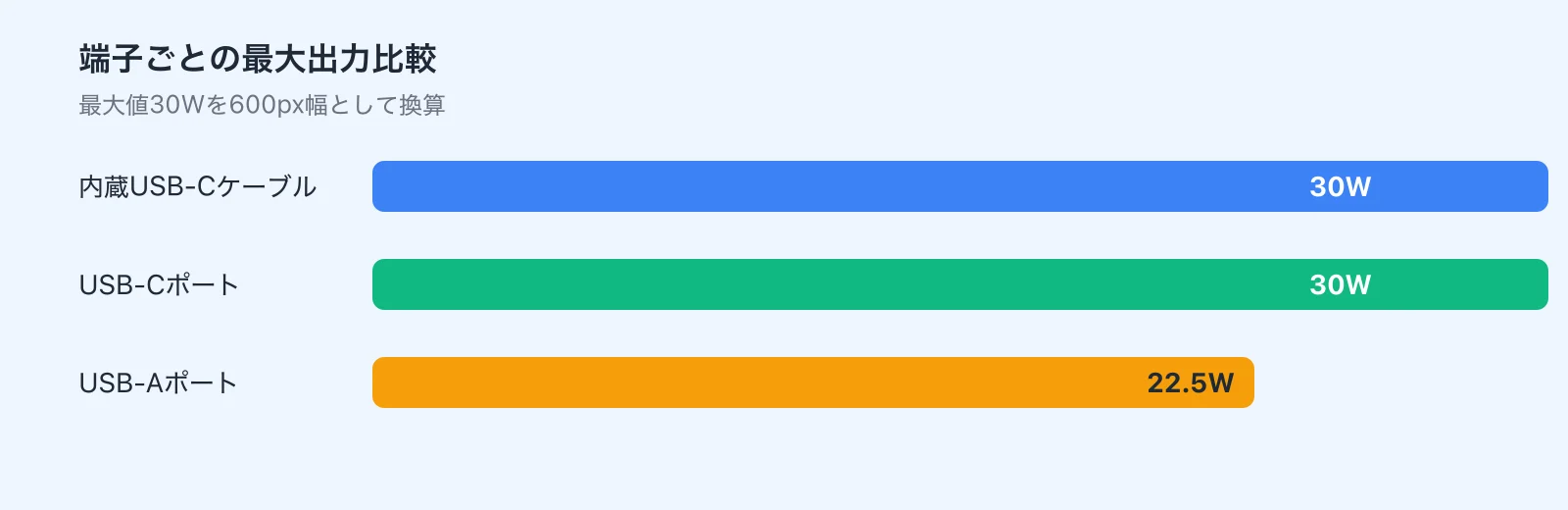
USB Power Delivery (PD) — the fast-charging standard for USB-C — is supported here, along with Anker's PowerIQ charging optimization. PD is what enables 30W output to USB-C devices. PowerIQ is Anker's proprietary system for adjusting charge delivery based on the connected device; it sits on top of PD rather than replacing it. PPS (Programmable Power Supply), used by some Samsung devices for their highest-speed charging modes, isn't confirmed for this model — if PPS compatibility is important to you, check the specs of whichever phone you're pairing it with before buying.
Understanding the Three Output Ports
Having three outputs matters less than understanding how those three outputs behave under different conditions.
The built-in USB-C cable and the USB-C port are the main event — both rated at 30W, which is the right spec for iPhones, USB-C Androids, and iPads. MacBook Air can receive power too, but frame that as transit top-ups, not a primary power source.
The USB-A port at 22.5W is more useful than you might expect. Wireless earbuds, older mobile hotspots, peripherals running on USB-A-to-C cables — there's more USB-A in most people's everyday setups than the spec sheets of 2024 would suggest. Keeping one USB-A port available means you don't have to retire older accessories just to use this bank.
Important caveat on simultaneous use: 30W per port is a single-device maximum, not a guarantee across all ports at once. When you're running all three simultaneously, power gets distributed. Phones and earbuds share the load fine in that scenario; don't expect to fast-charge a tablet while topping off two other devices at the same time.
Recharge Speed: 30W Input, ~1.5 Hours to Full
A power bank's self-recharge speed is just as important as what it can output. At 30W input, Anker rates this at around 1.5 hours to full charge. That's fast enough that a short window before leaving — even 45 minutes — gets you to roughly 50%. Forgetting to charge it the night before doesn't necessarily sink your day.
The bank recharges via the built-in USB-C cable, which keeps the whole workflow clean. If you already carry a 30W-range USB-C charger, this bank slots right in without adding extra cables to the equation.
Pass-Through and Multi-Device Gotchas
The absence of pass-through charging is worth understanding before you buy. You cannot charge the bank from a wall outlet while simultaneously charging a phone through it. In a hotel room or café with one available outlet, this means you have to choose: charge the bank, or charge your phone directly. The bank can't do double duty as a bedside charger that also feeds your phone overnight.
For people who want a single device that handles both roles — power bank on the go and charger at the desk — this is a meaningful gap. It's not a defect; it's a design choice. But it's one that will frustrate you if you didn't know about it going in.
The three-port simultaneous setup also has a caveat worth repeating: output is distributed, not multiplied. Fast-charging a tablet while also charging a phone will mean neither gets 30W. The practical mental model: one device = full 30W; multiple devices = split power, extended runtime. Use it for recovery, not for racing against a countdown.
💡 Tip
The best use of 30W is one device at a time — the built-in USB-C cable or the USB-C port, one phone or tablet charging solo. Three-device mode is a convenience feature, not a speed feature.
Airline Carry-On and Safety
On safety compliance: Anker markets this product as PSE-compliant for the Japanese market. PSE is Japan's Electrical Appliance and Material Safety Law marking, relevant for anyone buying through domestic Japanese channels. If you need documentation for the specific model number (A1259), contacting Anker directly is the way to go — the certification number isn't surfaced on the product page.
For airline travel, power banks are regulated by watt-hours (Wh). The formula is mAh × voltage ÷ 1000. At the standard 3.7V nominal, 10,000mAh works out to ~37Wh — well under the 160Wh carry-on limit. You won't have issues at security with this one. Banks above 100Wh face quantity limits; this is nowhere near that threshold, which is part of why the 10,000mAh class is popular for travel.
What Works Well in Real Use
Commuting: The Cable You Don't Have to Remember
Where this bank earns its keep most obviously is the morning rush. When your phone is running low on the way to the station, being able to pull out the bank and plug in directly — no cable fishing required — is a small thing that makes a genuine difference. Power bank satisfaction isn't really about specs; it's about whether you can use it the moment you need it.
In my experience, the "one fewer thing in the bag" effect compounds. Short USB-C cables have a way of disappearing among keys, earphone cases, and ID holders. With this bank, that search is off the table. More practically: you can't forget the cable when the cable is the bank. That kind of failure mode just goes away.
Anker's own testing cites approximately 50% charge on an iPhone 14 in 30 minutes at 30W (real-world results vary by device, temperature, and settings). That's fast enough to make a meaningful dent during a commute or a lunch break. For the "just need a bit more" scenario, 30W from a built-in cable is the right tool.
Travel and Business Trips: The Display Earns Its Place
On longer trips, what matters shifts from raw capacity to knowing how much you have left. At an airport or on a train, being able to read a number rather than count blinking LEDs changes how confidently you make charging decisions. The difference between "roughly half" and a precise percentage is real when you're trying to decide whether to top off now or wait.
10,000mAh in practice translates to roughly 1.8 to 2 full phone charges after accounting for efficiency loss. For a one-to-two night trip with a phone as the primary device, that's comfortable — enough to top off in the morning and again in the evening without rationing.
The fast self-recharge is useful on trips too. Fifty percent in about 45 minutes means hotel morning prep time is enough to recover meaningful capacity. A full charge in ~1.5 hours means an overnight charge is a realistic expectation, not wishful thinking. Pairing it with a compact 30W-class USB-C GaN charger completes the travel kit neatly.

Café Work: Phone and Tablet Together
Café sessions increasingly mean more than one device — a phone, maybe an iPad, wireless earbuds. The combination of the built-in cable, the USB-C port, and the USB-A port means you can keep your phone charging while adding a second device when needed. The intent is less about fast-charging everything and more about keeping multiple devices alive through a work session.
The realistic workflow: prioritize the phone, get it back to full, then let the tablet run a trickle charge for notes or reference use. At 10,000mAh, you're supporting one full phone charge and a supplementary tablet top-up — not running both at full speed simultaneously. For people who consistently carry a phone and a tablet, the port flexibility matters more than total capacity.
The display helps here too. Knowing the remaining percentage lets you make an active call: "I can afford to charge both right now" versus "I should hold the capacity for my phone." A 4-LED indicator doesn't give you that granularity.
MacBook Air: Emergency Use, Not Primary Power
30W to a MacBook Air isn't useless — it can slow battery drain during light document or browser work, add a few percentage points during sleep, and buy you time before a meeting. In a situation where shutting down mid-session is the only alternative, having this bank in your bag is genuinely helpful.
But don't oversell it to yourself. This is emergency-extension territory, not laptop power supply territory. Under heavier load, the Mac's consumption can outpace what 30W provides, and your battery will still drain — just more slowly. For long café work sessions centered on a MacBook Air, you'll want more capacity than this bank carries.
My use case for it: pre-meeting recovery of a few percent, or keeping a MacBook Air alive through a transit leg where plugging in isn't an option. Think 30-minute insurance, not all-day support. That's where it earns its place.
ℹ️ Note
The useful question for MacBook Air isn't "can it charge?" (yes) but "in what situation does it actually help?" Short-window emergency extension is the answer.
Bag Feel and Display Usability
Size-wise, the thing that actually registers in daily carry is the thickness more than the footprint. At 104 × 52 × 26mm, it's not a slim slab — it's a compact brick. It fits better in a bag with some structure than in a thin tech pouch. In a pants pocket with your phone, it's noticeable.
The thickness isn't only a downside — it makes the bank easy to grab by feel in a bag, and the built-in cable means you're not rummaging for two separate items. Still, this is a bag-friendly device, not a pocket-friendly one.
The display earns its cost in everyday use. Knowing the precise percentage lets you make a confident call — "I can fast-charge my iPhone right now and still have enough to get home" — rather than hedging because the LED count left you uncertain. It's a quiet feature that does a lot of work in the background.
What Falls Short in Real Use
~215g Is Smartphone-Heavy — Lightness Is Not This Bank's Game
The key thing to set straight going in: this bank is portable, not ultralight. Fine in a bag; noticeable in a pocket. With a phone in your front pocket, the combined weight registers with every step.
The size-to-weight ratio is what surprises people. A palm-sized device at ~215g is denser than it looks. That's a different experience from the featherlight 5,000mAh mini banks — not a flaw, but a choice that matters depending on how you carry your gear. A jacket pocket or small crossbody bag accommodates it fine; you won't forget you have it, but you won't resent it either.

The people most affected by this are those trying to travel as light as possible. Commuter backpacks? Fine. Minimal lunch bag or near-pocketless carry? The weight friction increases. If 10,000mAh of coverage is your priority, the weight is easy to accept. If pure lightness is your goal, it isn't.
One-Handed Use With the Cable Connected Is Uncomfortable
The built-in cable is a convenience feature, but using your phone one-handed while the bank hangs from its USB-C port puts mechanical stress on both the cable and the port. The bank's weight becomes a pulling force, and any rotation of your hand or phone changes the angle of stress at the connector junction.
On a table or in a bag, this isn't an issue. It comes up in unstable situations — standing at a platform checking a map, in a crowded train with one hand, or walking while replying to messages. Those are exactly the moments when you'd want a mobile charger, and they're also the moments where this design shows its limitations.
My preference is to set the bank somewhere — a bag, a desk, your lap — and let it charge from there rather than gripping the combined phone-and-bank as a single unit. If your use case involves holding your phone for gaming or video while charging, the built-in cable design creates friction that a separate cable wouldn't. One-handed comfort while charging isn't a strong point of this form factor.
No Pass-Through Is a Real Limitation for Some
The no-pass-through issue is clearest at a desk. If you want to plug the bank into a wall adapter and have it also feed your phone simultaneously — say, to top off everything from one outlet — that's not supported here. One-device-at-a-time is the rule when the bank itself needs charging.
For minimalists trying to consolidate gear, this stings a bit. The built-in cable reduces cables on the go; the lack of pass-through limits flexibility at the desk. Great for outdoor carry, requires workarounds for bedside or desk use.
If you're the kind of person who wants a single device to cover both roles — portable power bank and wall charger — you'll want to look elsewhere. A compact GaN USB-C charger alongside this bank gives you that flexibility without compromise.
Button Feel Isn't Impressive
Minor detail, but worth flagging: the physical button is functional, not satisfying. It's how you wake the display and cycle through battery readings, so you'll hit it regularly. It doesn't have the tactile snap of a well-engineered button — it just works.
This won't bother most users. But if you appreciate a crisp button feel, or if you're the type to check your remaining capacity repeatedly throughout the day, the button will register as "fine but not great" rather than invisible. For a bank with a display that invites interaction, slightly better button feel would round out the experience. As-is, it's a minor drag on an otherwise solid product.
How It Compares to Other Anker Power Banks
Side by side, this bank's position in the lineup is clear. 10,000mAh + 30W + built-in USB-C cable is the defining feature set, but the right choice depends on what problem you're actually solving — reducing cable count, minimizing weight, or maximizing capacity.
| Model | Capacity | Weight | Max Output | Ports | Price | Best For |
|---|---|---|---|---|---|---|
| Anker Nano Power Bank (30W, Built-In USB-C Cable) | 10,000mAh | ~215g | 30W | Built-in USB-C + USB-C + USB-A | 5,990 yen (~$42 USD) on Anker Japan | Daily carry, cable-free convenience, phone-first use |
| Anker Power Bank (10000mAh, 30W) | 10,000mAh | N/A | 30W | USB-C × 2 + USB-A | N/A | Flexible cable choice, versatility |
| Anker Nano Power Bank (22.5W, Built-In USB-C Connector) | 5,000mAh | N/A | 22.5W | Direct USB-C connector | N/A | Emergency backup, minimum size, one-handed use |
| Anker Zolo Power Bank (10000mAh, 30W, Built-In USB-C Cable) | 10,000mAh | N/A | 30W | Built-in USB-C | N/A | Value comparison, similar concept at a lower price |
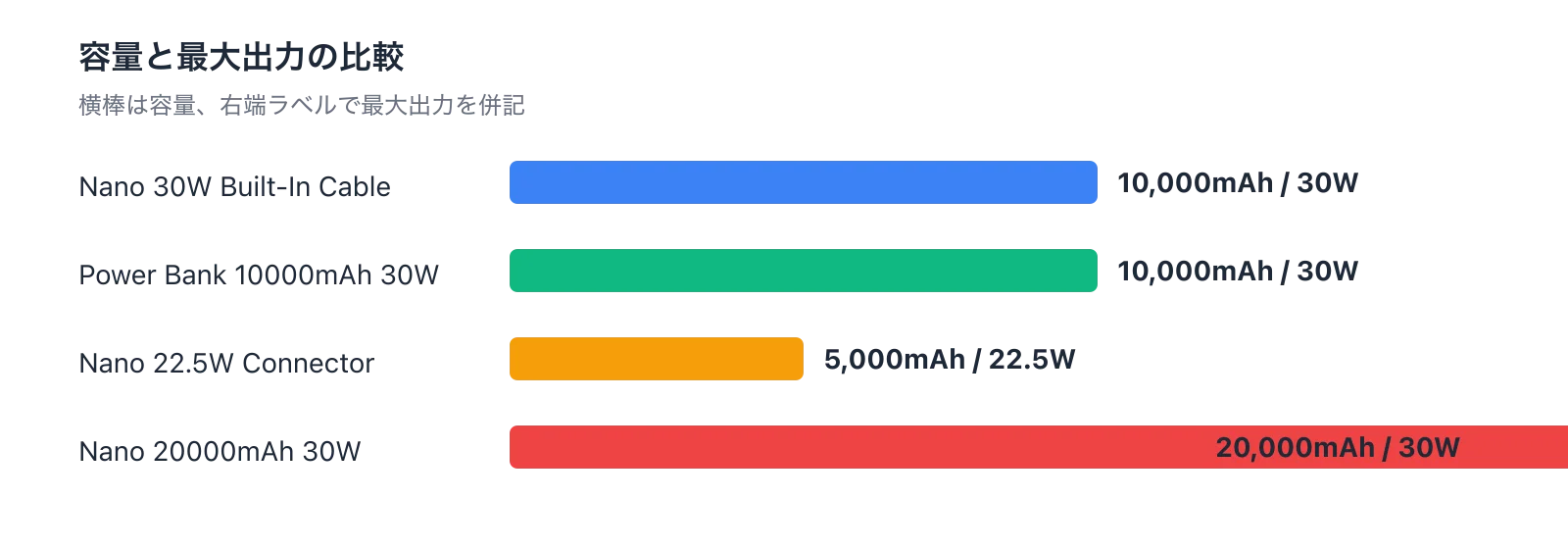
vs. Anker Power Bank (10000mAh, 30W)
This comparison is more about philosophy than specs. Same capacity, same wattage — but the standard Power Bank drops the built-in cable and adds more USB-C port flexibility. If you want to plug in a third-party cable, charge two USB-C devices at once, or keep full control over which cable you use, that model fits better.
The Nano's edge is in the moment of use. Pulling the bank out and plugging it in immediately — no cable hunting — sounds like a small thing until you experience the opposite. In my experience, a power bank's real-world usage rate is determined more by how easy it is to start using than by how much it can technically output. One forgotten cable renders any non-built-in bank useless for that trip.
The decision: built-in cable convenience vs. port flexibility and cable freedom. Phone-first, grab-and-go users lean toward the Nano. Cable-choosers and desk users lean toward the standard Power Bank.
vs. Anker Nano Power Bank (22.5W, Built-In USB-C Connector)
These are different tools. The 22.5W model is a 5,000mAh direct-plug design whose entire identity is built around being as small and light as possible. It's terrific as a pocket emergency backup — plug it directly into your phone, get a quick boost, move on. For all-day coverage, the 10,000mAh Nano wins clearly.
Where the 22.5W model excels is one-handed integrated use. It's easier to carry phone-plus-bank as a single unit when the bank is tiny. The trade-off is hitting capacity limits by mid-afternoon on a heavy phone-use day.
Minimum weight for emergency backup → 22.5W connector model. Reliable all-day power source → this 30W 10,000mAh. Those are different jobs.
vs. Anker Nano Power Bank (20000mAh, 30W, Built-In USB-C Cable)
The 20,000mAh version is the right answer for heavier demands. Multi-day trips, tablet-plus-phone use cases, sharing with family or colleagues — all of those benefit from double the capacity. On a long-haul train journey or a travel day where you need to run a phone and tablet simultaneously, the confidence margin is significantly higher.
For everyday carry, the 10,000mAh version is more appropriate. A power bank's weight profile shapes whether you actually bring it — and 10,000mAh remains comfortably within "daily carry" territory while 20,000mAh starts feeling deliberate.
My personal line: 10,000mAh for daily carry; 20,000mAh when I know I'll be away from power for multiple days. Commuting, day trips, light travel → 10,000mAh. Multi-night trips or laptop-and-phone days → 20,000mAh.
Anker Zolo Power Bank (10000mAh, 30W, Built-In USB-C Cable) as a Value Alternative
Within the built-in-cable 10,000mAh 30W category, the Anker Zolo Power Bank is worth a look as a cost-comparison option. It's a close match in concept, so the evaluation narrows to build quality, display quality, and price positioning. Third-party testing has cited a ~75.98% real-capacity ratio for the Zolo — a useful data point when comparing two banks with identical rated specs.
For this review, the focus stays on the Nano. Factoring in display clarity and Anker's overall daily-carry positioning, the Nano remains the stronger daily-driver pick — but if budget is the primary driver, the Zolo is worth checking the current price before deciding.
See "Anker Nano Power Bank 30W Review: Built-In Cable Usability Tested" for more.
Price and Upgrade Logic
What Does 5,990 Yen (~$42 USD) Actually Buy You?
The official Anker Japan price is 5,990 yen (~$42 USD, tax included). For a 10,000mAh bank, that's not budget pricing. But this isn't just a capacity purchase — it's a 10,000mAh + 30W + built-in USB-C cable + percentage display purchase, all in one unit.
Cheaper banks in the same capacity class tend to cut corners somewhere: lower wattage, basic LED indicators, no integrated cable. This one doesn't. The entire point is being ready to use the moment it leaves your bag — no cable to attach, no guessing on remaining capacity. When I evaluate this category, I weight friction-to-first-use heavily. By that measure, 5,990 yen is easy to justify.
The 30W bidirectional support adds value too. Fast out, fast back in — the bank works hard in both directions, which means you're not babysitting a slow-charging slab overnight before each trip.
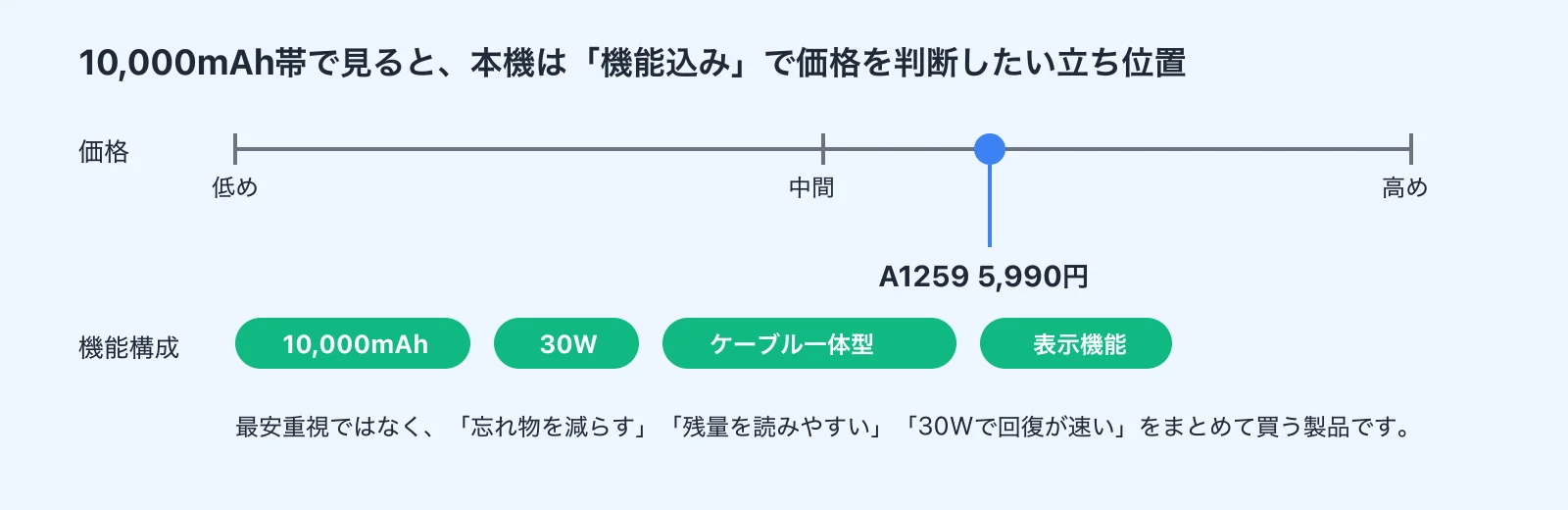
If you're purely optimizing for the lowest price per mAh, there are cheaper options. But this bank isn't trying to win on that metric — it's competing on how little it asks of you when you're actually using it.
Upgrading From a 5,000mAh Direct-Plug Bank
If you own a 5,000mAh plug-in bank and consistently find yourself running short, this upgrade has a clear payoff. The daily experience shifts from "emergency reserve" to "reliable all-day power." 10,000mAh at 30W means you can top off at lunch and comfortably make it through the evening, rather than rationing from the moment you pull the bank out.
The output bump matters too. At 22.5W and below, you're in phone-specific territory. At 30W, the bank is also useful for tablets and can provide meaningful emergency power for a MacBook Air. That's a broader safety net from one device.
The counterpoint: if you only reach for your power bank a few times a month, the improved specs won't feel proportional to the price jump. A 5,000mAh backup remains the right tool for rare emergency use. The upgrade makes sense when you're hitting capacity limits regularly — if that describes you, the Nano's reliability dividend is real and daily.
Who Should Look at the 20,000mAh Instead
This bank is at its best as a smartphone-centric daily carry item — commuting, day trips, 1-night stays. The capacity and output are sized right for that use case without becoming over-engineering.
The 20,000mAh is for heavier demands: trips of two days or more, regular tablet use alongside a phone, or situations where you're sharing power with others. On a long train journey running phone and tablet simultaneously, the larger bank's advantage becomes tangible.
For laptop use, the 20,000mAh also makes more sense if that's a regular scenario. 30W to a MacBook Air from a 10,000mAh bank means the capacity runs out before the laptop session ends; 20,000mAh extends that window meaningfully.
The dividing line is simple: does your daily use stay within one day and phone-primary? Stay with 10,000mAh. Multi-day, multi-device, or laptop-heavy? Consider the 20,000mAh.
Who Should Buy It — and Who Shouldn't
Buy It If
The strongest match is someone who commutes and wants one reliable charge or slightly more per day. Top up at noon, still have coverage through the evening. That cycle works well with 10,000mAh at 30W. As a primary daily bag power bank, the capacity, speed, and convenience balance is hard to beat.
Travelers who want to eliminate cable-related packing anxiety are also a natural fit. The more gear you're managing on a trip, the more the built-in cable earns its keep. Needing a charge at an airport or in transit and being ready without searching your bag is a legitimate quality-of-life improvement. For trips of one to two nights with a phone as the centerpiece device, this is a comfortable choice.
iPhone 15/16 or USB-C Android users get the most seamless experience. The full USB-C ecosystem — bank, cable, phone — just works. iPhone 15/16 users especially benefit from moving fully away from Lightning; everything charges from the same port and the same built-in cable.
People who want MacBook Air emergency top-up coverage alongside their phone will also find this useful. The key word is "emergency" — light work sessions, pre-meeting recovery, staying alive through a transit leg. If you carry a thin laptop and a phone and occasionally need quick power without hunting for an outlet, this bank covers that scenario without adding excessive weight.
Skip It If
Anyone prioritizing absolute minimum weight will find this bank heavier than expected. It's portable, but not in the "forget it's there" sense. The Anker Nano Power Bank (22.5W, Built-In USB-C Connector) at 5,000mAh is the right answer for that use case.
Users who need pass-through charging will run into the bank's hard limit. If your workflow involves using the bank like a charger — plugging it into the wall and simultaneously feeding your phone from it — this isn't the right tool. That's a distinct category of device.
Laptop-centric users should also look further. 30W to a MacBook Air works for brief top-offs, but sustained laptop sessions need more capacity than 10,000mAh provides. If your MacBook Air is the device you're protecting, a higher-capacity bank is the honest answer.
People who rarely leave a power-accessible environment don't need this. If home and workplace both have easy outlet access and you only use a power bank a handful of times per year, the added capability over a simple 5,000mAh backup won't translate into meaningful day-to-day value.
Quick framework: primary use is charging your phone one to two times per day → strong buy. Weight is the top priority → 5,000mAh direct-plug. Multi-day or multi-device travel → consider 20,000mAh.
FAQ
Q. Does it support pass-through charging? A. No. You can't charge the bank from a wall adapter and simultaneously output to your phone. Plan around that limitation.
Q. Can it charge a MacBook Air? A. Yes. 30W output is usable with MacBook Air for light-use supplemental charging or keeping it alive through transit. For sustained work sessions, the capacity will run out faster than you'd like. Pairing this bank with a compact 30W GaN USB-C charger gives you the best of both worlds.
Q. Is it allowed on airplanes? A. Yes, comfortably. At ~37Wh (10,000mAh × 3.7V ÷ 1000), it's well under the 160Wh carry-on limit and well under the 100Wh threshold where per-device quantity limits kick in. Standard travel power bank.
Q. How many times can it actually charge my phone? A. Real-world capacity is typically 65–70% of the rated mAh due to conversion losses. In practice: roughly 1.5 to 2 full charges for a typical smartphone. That's the honest range to plan around.
Q. Who is this best suited for? A. Someone who carries a phone as their primary device and wants to reduce what they carry — one bank, one cable, done. USB-C phone users on iPhone 15/16 or Android get the most seamless experience.
Q. Who should avoid it? A. People who need ultralight, people who want charger-plus-battery functionality (pass-through), and laptop-primary users who need extended runtime from a single bank.
Q. Is it worth it as a travel power bank? A. Yes. The built-in cable removes one packing variable, and 10,000mAh covers one-to-two-night trips well with a phone as the primary device. For travelers also managing wearables and smart devices, checking out a guide like the Smartwatch 2026 comparison guide (Apple/Pixel/Galaxy) might round out your overall travel kit planning.
Q. Does it support PPS charging? A. PPS support isn't confirmed in official documentation. USB PD at 30W works, but if you're relying on PPS for maximum-speed charging on a Samsung device, verify compatibility before purchasing.
Related Articles
Anker Prime 27650mAh 250W Review: Testing the 140W Output and 665g Weight
Anker Prime 27650mAh 250W Review: Testing the 140W Output and 665g Weight
Can the Anker Prime Power Bank (27650mAh, 250W) actually charge a laptop on the go? We break down the 140W output, 99.54Wh capacity, ~665g weight, and 24,990 yen (~$167 USD) price tag with real-world data to help you decide.
Anker Nano Power Bank 30W Review | Testing the Built-In Cable in Real Life
Anker Nano Power Bank 30W Review | Testing the Built-In Cable in Real Life
A hands-on review of the Anker Nano Power Bank (30W, Built-In USB-C Cable). We break down whether the 10,000mAh capacity, 30W output, built-in USB-C cable, and 215g weight actually hold up in daily use — with comparisons against the Anker Power Bank 30W, Zolo, and the 45W retractable-cable model.
How to Choose a USB-C Cable: Charging, Data Transfer, and Video Output Explained
How to Choose a USB-C Cable: Charging, Data Transfer, and Video Output Explained
USB-C cables all look the same, but what's inside is a completely different story. You can charge a laptop fine but photo transfers crawl, or you plug into a monitor and get nothing — most of these headaches disappear once you realize that higher wattage does NOT mean faster data transfer.
How to Choose a Laptop Charger | Finding the Right Wattage in 3 Steps
How to Choose a Laptop Charger | Finding the Right Wattage in 3 Steps
USB-C laptop chargers all look the same at a glance, but the real question isn't about the connector — it's about how many watts your laptop actually needs. Get that wrong and you're stuck with slow charging, a battery that drains mid-session, or a charger that doesn't work at all.