
Wired vs Wireless Earphones: Sound Quality, Latency, and Everyday Usability
Wired vs Wireless Earphones: Sound Quality, Latency, and Everyday Usability
The real question isn't which is better — it's which one actually fits how you listen. At the same price point, wired still wins on raw audio quality and latency. If lip-sync drift in movies or split-second timing in FPS and rhythm games matters to you, that gap is real and hard to ignore.
The real question with earphones isn't which type is objectively better — it's which one actually fits how you listen. At a comparable price point, wired still has the edge on pure audio quality and latency. If you care about lip-sync drift in movies or split-second response in FPS games and rhythm titles, that gap is real and worth thinking about.
On the flip side, for a crowded commute or a home video call, the sheer comfort of not wrestling with a cable is hard to beat. Factor in battery anxiety and the occasional "where did I put the right earbud" panic, and the picture shifts fast. This article breaks things down across four axes — sound quality, latency, convenience, and long-term cost — so you can figure out which type actually wins for your daily life.
The Short Answer and Four-Axis Comparison
Four-Axis Breakdown: Sound / Latency / Convenience / Long-Term Cost
The simplest way to frame this: prioritize audio quality, go wired; prioritize day-to-day ease, go standard true wireless; want wireless but with minimal lag for video or gaming, go for a low-latency-focused option. Wired skips Bluetooth's compression pipeline entirely, which at the same price range translates to a clear advantage in both sound quality and response time. True wireless earphones counter with cable-free comfort, ANC, ambient sound modes, and smooth call handling. Add game-mode TWS and 2.4 GHz dongle-based options into the mix, and a third path opens up: wireless convenience with latency actually worth caring about.
The table below is designed to give you the directional picture at a glance.
| Type | Sound Quality | Latency | Convenience | Long-Term Cost |
|---|---|---|---|---|
| Wired earphones | Strongest at the same price point — cleaner transient detail and soundstage separation | Minimal. Real advantage for FPS and rhythm games | Cable can get in the way during movement | No battery degradation. Broken cable? Swap or re-cable it |
| Standard true wireless | Can be excellent depending on codec and tuning, but generally behind wired at the same price | Standard Bluetooth typically 100–200 ms. SBC around 220 ms ±50 ms, aptX around 70 ±10 ms, aptX Adaptive approximately 80 ms | Best overall. Works for commuting, calls, and desk use | Battery degradation means a replacement every few years |
| Low-latency wireless / dongle-based | Perfectly usable, but the design priority is latency over absolute audio quality | aptX LL targets 40 ms, real-world measurements around 55–60 ms. Many 2.4 GHz dongle products claim sub-40 ms | Adds a dongle connection or game mode toggle to manage | Involves the device itself plus a dongle or compatible hardware |
Understanding latency ranges by codec keeps the decision from getting murky. Bluetooth behavior shifts dramatically depending on the codec in play. iPhones lean heavily on AAC; Android devices, depending on the model, can reach aptX Adaptive or LDAC. LDAC transmits at 96 kHz/24-bit; aptX Adaptive runs at 48 kHz/24-bit with variable bitrate between 280 and 420 kbps. For video and gaming though, low latency beats high-resolution audio — and for rhythm games specifically, getting close to wired-level response means targeting 20 ms or under, which standard Bluetooth can't realistically hit. Wired or a 2.4 GHz dongle are the real options there.
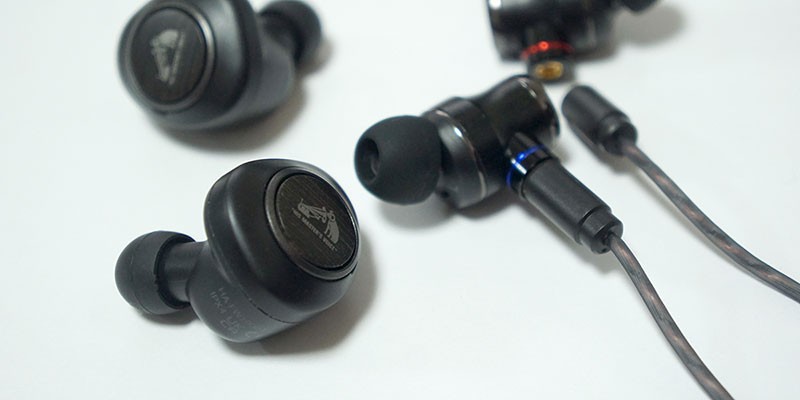
ヘッドホンの豆知識 vol.14 ワイヤレスとワイヤードそれぞれの強みと選び分け方
イヤホン・ヘッドホン選びに参考になるワイヤレスとワイヤードそれぞれの強みについて簡単に解説します。
www.jvc.comQuick-Reference: Which of the 3 Types Fits Your Situation
When you're stuck deciding, it's faster to think "where do I want to eliminate friction?" rather than hunting through spec sheets. The right answer at your desk while focusing on music is completely different from what you need on a crowded train or in a back-to-back meeting day.
| Use Case | Best Type | Why |
|---|---|---|
| Music listening as the top priority | Wired earphones | More of the budget goes toward drivers and housing at the same price — no compression penalty |
| Commuting and calls | Standard true wireless | Cable-free handling, plus a wide selection of models with ANC, ambient sound, and multipoint |
| Casual video or gaming, wirelessly | Low-latency mode TWS | Noticeably less drift than standard Bluetooth, good balance of usability |
| FPS or rhythm games | Wired / 2.4 GHz dongle | Response speed matters. For sub-20 ms targets, these are the only two real options |
The trickiest part of the current market is that true wireless has gotten so capable that "can't I just use this for everything?" feels like a reasonable question. Upper-tier TWS like a flagship AirPods Pro delivers genuinely impressive comfort and overall experience on the move. But for DAW work where precise positioning matters, video editing where you're sensitive to any drift, or rhythm games where you're chasing tight judgment windows — wired and dongle-based options still hold ground that hasn't been taken.
LE Audio and LC3 are worth keeping an eye on, but right now they're "promising next-in-line" rather than here-and-now options. The practical framework for today is still: wired, standard TWS, or low-latency focused. Getting that sorted first makes the next buying decision a lot cleaner.
担当エンジニアが解説!「Bluetooth LE Audio / LC3」|株式会社final【公式】
note.comWhat Actually Separates Wired from Wireless
The Signal Path, Step by Step
The clearest way to understand the difference between wired and wireless is to follow the path audio takes from your device to your ear. With wired, it's essentially a straight line: device → DAC → amplifier → earphone driver. The device converts the digital signal to analog, amplifies it, and sends it to the driver. No Bluetooth compression anywhere in that chain. Plug in a USB-C DAC and the conversion moves from the device's internals to an outboard unit, but the logic stays the same.
Wireless adds several steps: device → codec compression → Bluetooth transmission → decoding → DAC → amplifier → earphone driver. An iPhone paired with a flagship AirPods Pro leans on AAC; some Android devices can reach LDAC or aptX Adaptive. Every method routes through a wireless encoding process. That extra chain is why wired has a natural advantage in keeping signal loss low and latency short — it's not just a legacy thing, it's physics.
That difference shows up in how the sound feels. From personal listening, wired tends to give cleaner transient edges, making it easier to follow fine decay and soundstage positioning. Wireless has closed the gap significantly — LDAC and aptX Adaptive push meaningfully toward high-quality reproduction, and LE Audio with LC3 is the next serious contender. But the transmission bandwidth ceiling is still there, so for information-dense music or video editing work where drift is unacceptable, "they're the same" isn't quite honest yet.
Where the gap is most obvious: anywhere with heavy wireless congestion. On a packed subway platform during rush hour, a fully wireless pair might occasionally thin out for a split second, or the audio-to-video sync on a clip might feel ever so slightly loose. In regular music playback you'd never notice — but in a fast-moving game or a dialogue-heavy scene, that moment matters. Wired is a pain to manage physically, but in those situations it just plays steadily without complaint.
For a solid grounding on the signal path differences and a practical take on latency, Audio-Technica's codec explainer lays out where AAC, aptX Adaptive, LDAC, and LC3 each sit and what they're actually for.
Sound Quality: Which Wins and by How Much
At the same price point, wired earphones still have the edge on audio quality alone. The reason is straightforward: a true wireless earphone has to split its budget across a battery, wireless chip, microphone, and charging case. Wired puts that same money into drivers, housing, and the cable — the parts that actually shape the sound. In the 5,000–15,000 yen (~$33–$100 USD) range, that difference comes through in density and how well decay is rendered. Personally, wired earphones at this level are consistently easier to hear fine trailing notes and get a clean sense of soundstage depth.
A good place to hear it: a quiet café playing solo piano. On a same-price-range comparison, wired lets you hear the key release, the room's air, the way the hall just barely opens up behind the note. Matched-budget wireless options can definitely sound good, but that specific quality — the quietness between sounds, the way reverb trails off — is one level cleaner on wired.
LDAC, aptX Adaptive, and LC3: Where They Fit
That said, wireless isn't a flat-out loss. LDAC supports 96 kHz/24-bit transmission; aptX Adaptive and aptX HD operate at 48 kHz/24-bit. That's a meaningful step up from the era when SBC and AAC were the ceiling. A well-tuned true wireless pair can reach "this is better than I expected" territory in midrange warmth and vocal presence.
LC3 belongs in this same trajectory — it's designed to close wireless's weaknesses gradually, balancing audio quality against power efficiency. It's not a wired replacement yet, but "wireless means rough quality" isn't the description anymore. The gap is genuinely narrowing, and when a phone and earphone pairing actually clicks, daily listening satisfaction can be quite high.
What ultimately determines sound quality isn't the codec name alone, though. Driver size and diaphragm design, how the DAC and amp stages are executed, how well the housing controls resonance — all of this matters, and two LDAC-capable earphones can sound quite different. The reason a wired earphone with a USB-C DAC can punch well above its price is that the budget flows into the analog chain rather than radio hardware.
Audio Quality Trends by Price Range
Entry to mid-range: wired wins. Below around 15,000 yen (~$100 USD), wired earphones direct more budget toward driver and housing quality — tighter bass, cleaner treble extension, a cleaner overall picture. Wireless at this level tends to prioritize features over pure audio, landing at "good enough" rather than genuinely impressive.
Higher up the price ladder, wireless closes in. Upper-tier true wireless products invest in internal DAC, amp, and DSP tuning, not just codec support — vocal texture and bass quality improve noticeably. A flagship AirPods Pro at 39,800 yen (~$265 USD) at the Apple Store Japan is hard to dismiss on audio quality alone; the full experience is that polished. But putting that same budget into wired earphones plus a USB-C DAC still tends to win on raw information and natural soundstage — at least for now.
So: same price range, wired generally leads. But with LDAC, aptX Adaptive, and LC3 generation hardware, the wireless gap is real but shrinking. Wireless is no longer just a convenience compromise. If you want fine note texture and smooth decay, wired at the same spend still gets you there more directly — but it's not an overwhelming advantage anymore.
Latency in Video and Gaming: What Actually Changes
The difference in how latency affects video versus gaming comes down to one thing: are you receiving audio, or does your input have to trigger it instantly? Video players often compensate for drift automatically, so slightly delayed audio is something you watch through. Gaming is different — a tap, a shot, a parry. The input and the sound are supposed to be one thing. Same latency, much harder to live with.
Latency Reference Table
"Bluetooth is slow" is too blunt to be useful. Thinking in terms of ranges by connection type gives you a much more accurate feel. Standard Bluetooth tends to land in the 100–200 ms range; SBC examples cluster around 220 ms ±50 ms. AAC, which is what most iPhone users are running, doesn't have a clean single reference number because it varies. aptX has been measured around 70 ±10 ms; aptX Adaptive around 80 ms. aptX LL targets 40 ms-class latency, though real-world measurements often come in around 55–60 ms. LC3, the LE Audio generation codec, targets low latency alongside power efficiency — promising for the future, but today more of a "next contender" than an established solution.
| Connection / Codec | Latency Range | Best Suited For |
|---|---|---|
| Wired earphone | Near zero | FPS, rhythm games, video editing, monitoring |
| Standard Bluetooth (SBC) | 100–200 ms range; reference examples around 220 ms ±50 ms | Music, calls, casual video listening |
| AAC | No clean single reference value | Daily iPhone use, video viewing |
| aptX | Reference examples around 70 ±10 ms | Video, casual gaming |
| aptX Adaptive | Approximately 80 ms | Video, casual gaming, low-latency mode TWS |
| aptX LL | Targets 40 ms; real-world examples around 55–60 ms | Wireless gaming use |
| LC3 | Low-latency-oriented next-generation | Future contender on LE Audio compatible hardware |
What the table makes clear: around 80 ms can feel quite comfortable for video, but for gaming that same number suddenly becomes a problem. For rhythm games aiming for wired-level feel, targeting sub-20 ms is the rough threshold — and that's where standard wireless falls short.

KAZUNOKO tech | ガジェットレビューのブログ-知らないものを知りにいこう。-
ガジェットレビューのブログ-知らないものを知りにいこう。-
kazunoko.techWhen the Latency Gap Actually Shows Up
In video, latency tends to stand out at moments where eye and ear converge on the same point — a character's lip movement, a drumstick hitting the head, a muzzle flash synced with a gunshot. But because playback apps often compensate, standard true wireless can feel fine for most casual viewing; you'll notice it only occasionally. That's why even AAC-focused earphones usually don't create obvious complaints during movies or streaming.
Gaming is a different story. In rhythm games where a tap sound comes back a beat late. In FPS titles where you've heard the footstep and you're turning — but the sound said a moment before your input caught up. In action games where a just-parry registers through audio cues. Honestly, even with low-latency mode TWS, putting it side-by-side against the same smartphone running wired can reveal a half-beat delay on gunfire or attack sounds. When you switch to wired, that sensation mostly disappears — because there's no codec encoding cycle, no wireless buffer, no round-trip delay in the chain.
This "wired wins" dynamic isn't just about using an older method. Bluetooth compresses audio, transmits it, decodes it on the receiving end, and adds buffer headroom to prevent dropouts. In gaming, that entire stack shows up as sluggishness. Wired cuts that chain down dramatically. Even running through a USB-C DAC or a 3.5 mm adapter, the input-to-sound responsiveness is noticeably tighter than standard Bluetooth.
Beyond Bluetooth: The 2.4 GHz Dongle Option
If you want wireless convenience but actually care about latency, there's a third path worth knowing. 2.4 GHz dongle-based systems aren't constrained by Bluetooth's shared specification — they pair a dedicated receiver with the earphone and optimize specifically for that combo. Real-world measurements in the 20–30 ms range exist, with many products claiming sub-40 ms. That's a meaningful step down from typical Bluetooth in practice, and it holds up well for video and casual gaming.
For rhythm games demanding sub-20 ms, wired still wins. A 2.4 GHz dongle is "wireless that can actually compete," not "wireless that becomes wired." Practically speaking: primarily video, standard Bluetooth low-latency mode is plenty; stepping into FPS or rhythm gaming territory, go dongle; chasing competitive judgment precision, go wired.
Everyday Usability: How Much Does Wireless Actually Win By
ANC, Ambient Mode, and Multipoint in Practice
The biggest everyday gap between wired and wireless isn't audio quality — it's how many steps disappear from your daily routine. When you factor in pulling your phone from a bag, untangling cable direction, routing the cord away from bag straps and jacket collars, true wireless's cable-free experience wins by a wide margin. On a crowded morning train with one hand occupied, popping earphones from their case and having them connect before you're through the turnstile removes one friction point from the start of your day.
ANC and ambient sound mode widen that gap further. On transit or in a café, ANC means you don't need to crank the volume to compensate for background noise. At a ticket gate, a register, or when a colleague calls across the office, flipping to ambient mode instantly is just more natural. Wired earphones with inline remotes exist, but true wireless packages the whole workflow — music, calls, ambient awareness — as a cohesive commuting experience. That's why upper-tier TWS get chosen despite strong competition on audio quality alone: the handling and fit are engineered specifically for this use case.
Multipoint and automatic device-switching are the same story — they show their value in motion, not on a spec sheet. Streaming music from your phone while a meeting notification pops up on your laptop, or taking a call while working on your computer without reaching for anything: once that's part of your routine, switching back to wired feels like giving something up. Apple devices handle this a little differently from standard simultaneous connection, but the smoothness of auto-switching is genuinely useful in practice.
Add wear detection to the picture and wireless becomes remarkably light to operate. Audio pauses when you pull an earbud out, resumes when it goes back in. Small feature, but over the course of a day that spans commuting, calls, and desk work, it adds up. The kind of usability advantage that doesn't come through in a spec comparison but shows up clearly in the first week of actual use.
The Hidden Running Costs: Battery, Loss, and Connection
That said, going wireless means taking on a set of ongoing responsibilities the moment you buy in. No cable — but now you have battery levels to track. Both the earbuds and the case need power, which means leaving them on your desk and discovering they're at 10% right before you walk out the door. That particular failure mode doesn't exist with wired.
Loss risk is real too. Small, independent left and right earbuds are the kind of thing that slips into a pocket corner, disappears into a coat lining, or gets swallowed by bedding. Wired earphones can snag and cables can break, but the "one earbud has vanished" problem simply doesn't come up. To be straightforward: some people find that management overhead more annoying than any audio quality difference. If you use them carelessly every day, it's worth thinking about whether you'll reliably return them to their case — and whether the case itself is something you'll actually use as a habit.
Connection reliability shapes daily impressions more than the numbers suggest too. In wireless-dense environments like busy train stations or downtown office districts, a moment's hesitation reconnecting is enough to break your momentum. Earphones that connect the instant the case opens are meaningfully better in this way. Getting music or a podcast started before you reach the platform is comfortable; having a reliable connection two minutes before a call starts matters. Earphones with unstable connections lose daily-use points fast, regardless of how many features they have.
Where wired genuinely shines is that this running cost is low by design. Plug in, it works. No battery level, no pairing. For long desk sessions — video editing, audio production, extended playback at home — that simplicity is a real strength. But for anyone whose use is primarily mobile, the full picture — cable-free handling, ANC and ambient sound, fast call connections — makes wireless the overall winner by more than a single step.
Long-Term Cost and Longevity: Which Is Actually Cheaper Over Time
Upfront Cost vs. Running Cost
Looking at retail price alone, true wireless can seem like the accessible choice. Add up what you spend over several years, though, and the picture shifts. True wireless earphones trade convenience for a built-in expiration date on their batteries. Battery degradation means replacement in a few years is a realistic expectation — it's not a hidden risk, it's just how the tech works.
Wired earphones wear out mainly at the cable. The plug joint and the Y-split are the vulnerable spots, but the drivers themselves tend to last well. Detachable-cable models can be extended further with a cable swap rather than full replacement. Short-term, wireless comfort usually wins. Over several years, wired can come out meaningfully cheaper.
A straightforward reality: the more hours you put in each day, the more that gap matters. If wireless mobility is worth the cost to you, the premium makes sense. If you'd rather get long mileage from a single pair, wired has the more wallet-friendly long-term trajectory.
USB-C DAC Compatibility: What to Watch Out For
One thing that often gets missed when choosing wired: phones without a 3.5 mm jack need an adapter or DAC, which adds to the real cost. A USB-C DAC or USB-C to 3.5 mm adapter is required, and the range runs from around 1,790 yen (~$12 USD) for an entry-level option at Japanese retailers, to several hundred to several thousand yen for adapters, up through mid-range USB-C DACs available at specialty audio shops and price comparison sites costing well over 10,000 yen (~$67 USD). Wired earphone ownership means thinking about the full input chain — not just the earphone itself.
The tricky part is that not all adapters are the same, even when they look identical. USB-C to 3.5 mm adapters come in two flavors: ones with a DAC built in, and ones that rely on the phone's own analog audio output. Models from brands like ELECOM or PGA that explicitly note DAC inclusion behave differently from ones that don't. Buying on price alone can result in no audio output at all, or an inline remote that doesn't work as expected — a hidden cost of wired setups that doesn't show up on the box.
Also worth noting: most USB-C DACs draw power from the phone, so you're not worrying about earphone battery while using wired — but your phone battery takes the small, steady hit instead. Weighed against the fact that wired earphones don't have a battery that degrades and forces replacement, the math over several years often favors wired plus a USB-C DAC when total spend is what matters. If adding peripherals sounds like a hassle, or you want to pull the earphone from a bag and be done with it, wireless fits that mindset better. Either way, the full picture is worth having before you decide.
Device Compatibility and Codec Selection
iPhone (AAC-Centric): The Practical Approach
With iPhone and Bluetooth earphones, the more useful question is "how well does this pair hold together on AAC?" rather than scrutinizing a compatibility table. iPhone stays in AAC territory, and Apple's own earphones are tuned around that pairing. Codec breakdowns from specialist audio retailers also frame iPhone use around AAC as the working baseline.
That said, AAC alone doesn't determine the experience. DSP processing on the earphone side, sync compensation from the video app, wireless stability in a crowded space — all of that feeds in. For movies, TV, and social video, drift is usually manageable. For a timing-sensitive rhythm game, the gap between AAC wireless and wired is real. Honestly, for iPhone users going wireless, focusing on AAC connection stability and how well the app handles sync compensation is more likely to lead to a good outcome than chasing codec names.
Android opens up more options. Devices supporting aptX variants or LDAC let you push further on audio density and detail, and LE Audio with LC3 is appearing on newer hardware. But more options doesn't mean simpler. Android codec support varies by SoC generation and licensing, not just the phone brand — and both the earphone and the phone need to support the same codec for it to matter. LDAC's high-resolution transmission can drop to a stability-first mode in congested wireless environments. aptX Adaptive's variable-rate approach trades headline specs for consistent real-world performance, which in practice often feels better balanced.
LC3 is the same: the name suggests "low-latency, high-quality solution," but that framing is still ahead of current deployment reality. As summarized in technical breakdowns of the LE Audio specification, LC3 compresses efficiently at lower bitrates and benefits battery life — appealing qualities. But for gaming, what matters is how well the low-latency mode is actually implemented. For music, connection stability and tuning quality move the needle more than codec branding.
Straightforwardly: Android gives you more choices, which also means more variation in results. Codec names are a useful starting point, but actual satisfaction comes from the earphone's processing, connection robustness, and how well it plays with your specific apps and use cases.
Recommendations by Use Case
Music Listening → Wired
For music as the main event, wired is the most logical choice. At the same price point, more budget flows toward drivers and housing — vocal edge, note decay, and soundstage transparency are all easier to get to. Plug in a USB-C DAC if the phone's output feels lacking; that combination slots in cleanly. Upper-tier TWS are competitive, but for pure audio information at the same spend, wired still leads.
Commuting and Calls → Standard TWS
For daily commutes, transit connections, and work calls, standard true wireless is the most complete package. No cable snagging on clothes or straps; ANC, ambient sound, and a microphone in one device; fewer reasons to think about setup at all. This use case rewards total-experience scores over audio purity, and multipoint-capable models or Apple-ecosystem earphones with smooth auto-switching fit naturally into days that alternate between personal and professional use.
Video as the Main Use Case → Low-Latency Mode TWS or Dongle
For YouTube, streaming, and film, low-latency mode TWS or a dedicated dongle-based option is safer than standard TWS. Small sync drift is the kind of thing that gets noticed, and here it's audio-to-video alignment that matters more than audio quality itself. For phone and tablet use, low-latency TWS is convenient; for setups that span PC and console, a dongle-compatible model handles the crossover better. Both approaches keep wireless usability while reducing the drift.
FPS Gaming → Wired or 2.4 GHz Dongle
FPS relies on directional audio and instant response — wired is the baseline. Footstep positioning and timing windows are tight enough that slight delay registers as wrongness, and standard Bluetooth drops in priority fast. For wireless-first setups, a 2.4 GHz dongle-compatible earphone is the realistic option. Competitive play: wired. Casual to mid-level: dongle.
Rhythm Games → Wired First; Wireless Only as a Special Case Below 20 ms
Rhythm games specifically demand wired as the first choice. Sync between note judgment, tap feedback, and audio is tight enough that any perceivable gap breaks concentration — and here convenience matters less than instant response. Wireless is a niche-case compromise: even TWS with strong low-latency claims often fall short, so if wireless is required, 2.4 GHz dongle or dedicated low-latency hardware is the target.
iPhone Users → AAC Stability and Real-World Pairing Over Spec Hunting
For iPhone users, finding a pair that holds together well on AAC is the most direct path to a good outcome. The codec selection doesn't expand with the phone, so chasing spec table entries doesn't help — consistent performance across video, calls, and music matters more. Apple's own lineup has the tightest integration with automatic device-switching; for third-party options, AAC-mode stability is still the first thing to check.
Android Users → Match the Codec to Your Device's Support and Use Case
Android users can narrow the codec field by starting with what the phone actually supports. Music priority: LDAC-capable earphones for maximum audio detail. Mixed video-and-gaming use: aptX Adaptive for a balanced tradeoff. Future-proofing with LE Audio in mind: LC3-compatible hardware is increasingly available. Final satisfaction, though, depends on the combination — device and earphone together, not either one alone.
Pre-Purchase Checklist and Next Steps
Running out of the door and realizing the case is at 10% — that's just part of owning true wireless earphones, and it's worth imagining it concretely before you buy. The upside is that running through a checklist before buying makes it much easier to see whether wired or a top-tier TWS is the right call for you.
The most consistent advice here: don't try to cover every use case with one purchase. Pick one primary use — music, video, FPS, rhythm games, daily commute — and think through what it feels like when that specific use case goes wrong. Starting there changes how you read a spec table.
Pre-Purchase Checklist: 5 Things to Confirm
- Have you narrowed it down to one primary use case?
Music as the focus, minimal drift for video, or directional response for FPS — the right format differs for each. Without settling this first, you risk buying a feature-forward TWS and then finding the one thing you actually care about is the weak spot.
- Do you know your phone's platform, and what that means for your connection baseline?
iPhone means working within AAC, and Apple's own earphones are optimized for exactly that. Android means LDAC and aptX Adaptive are on the table, so whether music quality or latency-plus-stability balance is the priority shapes which models are worth considering. Settling the phone side first eliminates a lot of spec-table noise.
- Have you compared the same budget as "one TWS" versus "wired + USB-C DAC"?
A flagship AirPods Pro at 39,800 yen (~$265 USD) at the Apple Store Japan is the reference point for TWS where convenience and audio are both polished. For wired-first thinking, that same budget can be split between the earphone itself and a USB-C DAC — entry-level DACs start around 1,790 yen (~$12 USD) at Japanese retailers, and putting real money toward the audio chain is a genuinely viable alternative.
- If gaming matters, are you planning to stick with Bluetooth alone?
For FPS or rhythm game use, the candidate list should include 2.4 GHz dongle-compatible options alongside wired. Standard Bluetooth latency is hard to work with for timing-sensitive input; dongle systems and wired both give you the response speed that gaming actually needs. Competitive priority: wired. Wireless comfort plus reduced latency: 2.4 GHz dongle.
- Can you picture actually managing the charging case in your daily routine?
For commuting and calls, what matters isn't just rated earphone playback time — it's the full case management loop. A flagship AirPods Pro delivers up to 8 hours on the earbuds with ANC on, and up to 24 hours with the case, so a round-trip commute of around two hours is easy to sustain for several days. That said, if you're the type who notices the case is at 10% on the way out the door, keeping a wired backup on hand is a real comfort.
Mini Glossary
SBC is Bluetooth audio's universal baseline codec — it connects to nearly everything, which is its main strength. On sound quality and latency, it's behind all the codecs above it, but it's the default that just works.
AAC is effectively the standard for iPhone and AirPods pairings. It compresses efficiently and handles music, video, and calls with reasonable balance — the right baseline for Apple-ecosystem users.
aptX is Qualcomm's widely-adopted codec for Android devices, offering better latency and audio balance than SBC. It shows up often when you want stable everyday performance without chasing the top of the spec ladder.
aptX Adaptive adjusts bitrate and latency behavior dynamically based on connection conditions. Handles both music and video reasonably well in one package, and you'll see it increasingly in mid-to-upper tier wireless earphones.
LDAC is Sony's high-quality codec, supporting transmission at 96 kHz/24-bit. It's aimed at music listeners who care about detail and spatial width — though its priority is audio quality, not low latency.
LC3 is the new codec for the Bluetooth LE Audio generation — designed to maintain audio quality at lower bitrates while extending battery life. LC3 has real potential, but adoption is still building. Right now, "next serious contender" is the accurate description.
For a closer look at LC3, technical breakdowns from audio specialists cover what the spec is actually designed to do. For codec comparisons overall, Audio-Technica's explainer and specialist audio retailer articles lay out the landscape well. Reading them together clarifies the difference between "codecs optimized for high-quality audio" and "codecs designed with real-world latency in mind."
A Note on Numbers in This Article
The baseline approach here: manufacturer specs first, then specialist audio retailers, then mainstream tech media. Codec specifications, bit depth, playback time, and pricing are most reliable closest to the source. Technical explainers from manufacturers and audio brands anchor the spec claims; specialty retailer articles help with comparative framing and practical interpretation. Individual blog posts and independent measurements are treated as directional examples, not definitive benchmarks.
Latency numbers specifically require care. The same product can measure very differently depending on whether it's a phone or PC, iOS or Android, whether the playback app applies sync correction, whether a Bluetooth transmitter is in the chain, whether you're measuring the earphone alone or end-to-end with display lag included. A 10 ms difference between two sources isn't unusual; a 30 ms gap between two supposedly similar references can simply mean they measured different things. Seeing numbers that read as 30-something versus 60-something for what looks like the same codec isn't a contradiction — it's different measurement conditions.
Specialist audio retailer content tends to be readable because it separates codec character from real-world feel. "High-resolution capable" and "fast response" are not the same axis. Conflating them leads to conclusions like "LDAC is great for gaming" or "low-latency mode means always wired-equivalent," neither of which holds up. In this article, numbers appear with context: manufacturer spec, retailer or media comparison reference, or individual measurement example — because knowing which type of number you're reading changes what you can do with it.
The single most dangerous habit in audio writing is pulling the smallest number from any available source and stating it as fact. Manufacturer-claimed low-latency mode, a specialist store's comparison test, and an individual's home measurement are each answering a different question. This article keeps those categories distinct so the reader has a realistic sense of what to expect on their own iPhone or Android, in their own game or living room setup.
Summary
Wired versus wireless isn't a question of which is better — it's about which of four things you're prioritizing: sound quality, latency, everyday convenience, or long-term cost. When you're stuck: commuting and calls, go true wireless; audio quality first, go wired; gaming response speed is non-negotiable, start with wired or a 2.4 GHz option. From there, use the checklist in this article to narrow your actual use case, match it to the use-case recommendations, and you'll have a concrete answer for what to buy today.
Related Articles
The Complete USB-C Cable Buying Guide: Same Plug, Wildly Different Performance
The Complete USB-C Cable Buying Guide: Same Plug, Wildly Different Performance
A clear breakdown of USB-C cable standards, transfer speeds, and charging capabilities — plus how to pick the right cable for what you actually need.
What Is USB PD? Understanding Wattage and Compatible Devices
What Is USB PD? Understanding Wattage and Compatible Devices
Just because a device has a USB-C port doesn't mean it supports USB PD fast charging. Confusing the two leads to the classic trap: buying a 65W charger and getting only 30W out.
The ¥30,000 (~$200) Desk Upgrade: How to Prioritize Across 3 Plans
The ¥30,000 (~$200) Desk Upgrade: How to Prioritize Across 3 Plans
How much your desk can change on a ¥30,000 (~$200) budget depends heavily on the order in which you buy things. Whether you want to ease shoulder and back pain, clear up desk clutter, or make a small room more workable, the right investment changes accordingly.
Carry-On Power Banks on Flights: The 100Wh/160Wh Rules Explained
Carry-On Power Banks on Flights: The 100Wh/160Wh Rules Explained
When flying, power banks must go in your carry-on — checked baggage is never an option. The key isn't mAh but Wh: under 100Wh is the standard safe zone, 100–160Wh requires airline approval, and anything above 160Wh is prohibited.