
How to Choose a Smartphone Camera | The Megapixel Trap, Explained
How to Choose a Smartphone Camera | The Megapixel Trap, Explained
Megapixels matter, but picking a phone based on numbers alone will likely disappoint you. I regularly shoot with 12MP, 50MP, and 200MP devices, and while higher resolution gives you more cropping room, I've had plenty of 200MP night shots come back grainy when I expected them to be crystal clear.
Megapixels matter, but picking a phone based on numbers alone will likely disappoint you. I regularly shoot with 12MP, 50MP, and 200MP devices, and while higher resolution gives you more cropping room, I've had plenty of 200MP night shots come back grainy when I expected them to be crystal clear.
This guide is for anyone who wants to know exactly how many megapixels they actually need — whether you're posting to social media, printing at A4, shooting at night, or zooming in on distant subjects. For context: full HD display requires only about 2.07 megapixels, and A4 at high quality print needs roughly 9 megapixels. More isn't automatically better. When you've finished reading, you'll be able to put a number on how much resolution your use case demands and run through a checklist before you buy. Our guides — "Best Smartphones | Matched to Your Use Case and Budget" and "How to Choose a Smartphone | Complete Beginner's Guide" — are worth a read alongside this one.
Why More Megapixels Doesn't Mean Better Photos
A megapixel count tells you how many individual dots make up an image. More dots means you can crop tighter or print larger without losing detail. That sounds like a straightforward win for high-resolution sensors — but actual image quality is far more complicated. Sharpness of fine detail is only one variable. Noise in low light, resistance to blown highlights and crushed shadows, camera shake, and color accuracy all play into how a photo looks. Megapixels alone can't account for any of those.
The numbers tell an interesting story. Many smartphones default to outputting around 12MP in everyday shooting, and for most situations that's more than enough resolution — it already exceeds the roughly 9MP needed for a high-quality A4 print, so social posts and home prints aren't a problem. That said, default output resolution varies by device, so always verify a specific model's specs on the manufacturer's page rather than assuming.
I notice this in my own shooting all the time. When I'm snapping travel photos to upload straight to social media, I genuinely struggle to see a difference between 12MP and 50MP output. On a phone screen, color rendering and HDR processing have a bigger visual impact than resolution. But when I photograph a sign and want to crop to just the text afterward, that extra resolution earns its keep. With 50MP or more, the letterforms hold together after a tight crop in a way 12MP shots simply don't.
The Foundation: Sensor and Lens Quality
What matters most in a smartphone camera is how much light the sensor can capture. Larger sensors gather more light, which translates to lower noise in dark conditions. Sony's sensor documentation makes clear how significantly capture area affects image quality. The Xiaomi 12S Ultra, for instance, uses a 50MP 1-inch-class sensor paired with an F1.9 lens and OIS — what makes it stand out isn't the megapixel count but the fact that a large sensor, a bright aperture, and stabilization are all working together. That combination helps it avoid pushing ISO too aggressively in low light, preserving shadow detail that smaller sensors sacrifice.
High-megapixel sensors like 200MP designs have different strengths: they're excellent at resolving fine detail in bright light and holding up under heavy crops. But because individual pixels are tiny, manufacturers design them to bin pixels together — Samsung's ISOCELL HP1 supports 4×4 hybrid pixel binning, which merges 16 pixels into one for an effective output of around 12.5MP. The headline "200MP" is real, but the image quality story underneath it is about how efficiently that sensor gathers and processes light, not just the raw pixel count.
OIS, EIS, and Image Processing Make or Break the Shot
Optical image stabilization matters — a lot. The same megapixel sensor with and without OIS will produce meaningfully different results when you're walking and shooting or dealing with low light that forces slower shutter speeds. EIS handles video stabilization electronically and improves the watchability of moving footage. Neither gets much attention in spec sheets, but OIS in particular has an outsized effect on how many shots actually come out sharp.
Then there's the ISP and AI processing layer, which is where smartphones increasingly differentiate themselves. HDR tone-mapping, skin rendering, edge sharpening, and night-mode noise reduction are all computed here, and they shape what the final image looks like as much as the hardware does. A 50MP or 200MP sensor processed aggressively can produce flat, over-smoothed images that feel less satisfying than a well-tuned 12MP pipeline. The way I think about it: a smartphone photo is a collaboration between what the sensor captures and what the processor decides to do with it.
Zoom and File Format Deserve Their Own Section
If you shoot distant subjects, optical zoom is worth prioritizing over raw megapixels. The Galaxy S23 Ultra combines 3× optical with a 10× periscope telephoto, and the optical reach it provides over distant subjects is a different category of result compared to digital cropping. Cropping from a high-megapixel capture can work, but optics that physically fill the frame avoid the detail degradation that digital enlargement introduces. The multi-lens designs on flagship phones — wide, ultrawide, telephoto — exist precisely to maintain image quality at different distances, not just to add camera count.
File format is another variable that doesn't get enough attention. JPEG is convenient and widely compatible, but it's a destructive format — heavy editing after the fact reveals its limits. HEIF offers better compression efficiency, often matching JPEG quality at roughly half the file size. RAW preserves the most editing latitude but comes with real storage and workflow overhead. Apple ProRAW on iPhone illustrates the tradeoff clearly: 12MP ProRAW runs around 25MB per file, while 48MP ProRAW jumps to roughly 75MB. Shooting high-resolution RAW for an entire trip accumulates fast.
💡 Tip
Megapixels provide a useful buffer in certain situations, but day-to-day satisfaction is built on sensor size, lens quality, stabilization, and image processing — not resolution alone.
The upshot is straightforward. Megapixels matter, but they're not the top priority. For social media, 12MP is more than sufficient — it's also comfortably above the A4 print threshold. For cropping, capturing text on distant signs, or reframing after the fact, 50MP and above starts to earn its keep. The right megapixel count isn't the biggest number you can find; it's the one that fits what you actually do with your photos.
The Basics You Need: Megapixels, Resolution, and Effective Pixels
What Megapixels Actually Measure
A megapixel count is simply the total number of pixels in an image — width multiplied by height. A 1,280×960 image has 1,228,800 pixels, or roughly 1.23 megapixels. Full HD video uses the same math: 1,920×1,080 equals about 2.07 megapixels. Understanding this framing helps make sense of the numbers — megapixels measure information density, not quality directly.
Once you see it that way, spec sheets start reading differently. A photo at 4,080×3,072px works out to roughly 12.5 megapixels. The "12MP" label on a phone is a shorthand for that pixel grid, nothing more exotic than multiplication. The abstraction of "megapixels" can make it feel like a mysterious quality metric, but the underlying concept is simple.
I felt this concretely when printing family photos at A4. A 12MP output consistently met the 300dpi target for that print size and looked genuinely sharp. Looking at spec sheets, the high-megapixel models always catch the eye — but once you calculate what your actual output size requires, it becomes much easier to filter out the noise.
That said, more pixels are genuinely useful in specific scenarios: cropping out part of a wide shot, pulling legible text from a distant sign, reframing a landscape after the fact. The point isn't that megapixels are irrelevant — it's that image quality doesn't reduce to them. The baseline: megapixels = total pixel count in the image.
How Megapixels Differ from Resolution (DPI/PPI)
Megapixels and resolution are related but distinct. Megapixels refer to the total pixel count of the image file itself. Resolution — expressed as ppi for display, dpi for print — describes how densely those pixels are packed into a given physical area. The same 12.5MP image can look sharp at 8×10 inches or pixelated at 24×36 inches. The image data doesn't change; only how spread out it is.
A4 at 300dpi makes this tangible. That print size requires 2,481×3,507px, or roughly 9 megapixels. For home photo printing, 300dpi is a reasonable benchmark; commercial print sometimes calls for 350dpi, but for personal A4 prints the difference is rarely visible. My own family prints at A4 confirmed this: 12MP was plenty, and the quality I cared about — skin tones, highlight and shadow retention — had nothing to do with whether I'd shot 12MP or 50MP.
On the flip side, smartphone screens reframe the calculation entirely. Most social media consumption happens on phones running at full HD to QHD, so a 200MP photo carries enormous data that never gets used for on-screen viewing. I've spent time with 200MP devices, and scrolling through shots on the phone itself, the resolution advantage is invisible. The difference shows up only when you crop aggressively or output at large print sizes.
ℹ️ Note
Think of megapixels as "how much image data exists" and resolution as "how densely that data is displayed." Keeping them separate avoids a lot of confusion.
With that distinction in hand, "high megapixels = high resolution" becomes a loose generalization at best. A 12.5MP image displayed at modest size and density can look excellent. A 200MP image blown up beyond its native output density will fall apart. The relevant thresholds: full HD video is ~2MP, a quality A4 print needs ~9MP. The same word "quality" means very different things depending on whether you're looking at a screen or a print.
Total Pixels, Effective Pixels, and Recorded Pixels
Three terms trip people up: total pixels, effective pixels, and recorded pixels. Total pixels is the full count on the sensor die, including areas used for edge processing and calibration. Effective pixels is the subset actively used for image capture. Recorded pixels is what ends up in the saved image file.
Camera specs make this concrete. The PENTAX K-1 Mark II lists ~36.77 million total pixels and ~36.4 million effective pixels. The sensor periphery handles correction and processing functions, so the two numbers diverge. When a spec sheet separates "total" from "effective," the effective figure is what's doing the real imaging work.
On smartphones, the gap plays out differently. A sensor rated at 50MP or 200MP will often use pixel binning to produce a lower-resolution output by default — the binning strategy varies by device, so the maximum sensor rating doesn't necessarily equal the normal shooting resolution. Check the manufacturer's spec page for default capture resolution before assuming.
This explains a common source of confusion: "my 200MP phone saves files that look the same size as my old 12MP phone." Sensor maximum, effective capture area, and saved file resolution are three separate things. Reading a spec sheet with that in mind — is this the sensor maximum, the capture area, or the saved output? — eliminates a lot of misreading.
The Megapixel Trap: What Happens When Sensors Shrink Per Pixel
Sensor Size and Per-Pixel Light Capture
The real question isn't how many pixels a sensor has — it's how much light each pixel can gather. Sensor size is essentially capture area. A larger sensor gathers more total light for a given scene, which means the signal can be amplified less aggressively. Less amplification means less noise, better shadow detail, and more preserved highlight gradations.
The gap is significant. Sony's sensor documentation notes that a full-frame sensor has roughly 30 times the area of a typical 1/2.3-inch smartphone sensor; APS-C comes in around 13 times larger. Comparing smartphones to DSLRs isn't the point — but the underlying physics of "more area = more light gathered" applies within the smartphone category too.
Packing 50MP or 200MP onto a small sensor divides that area into smaller and smaller pixels. Smaller pixels receive less light, which puts them at a disadvantage in dark conditions. The pixel pitch numbers illustrate this: Sony's IMX989 has a 1.5μm pixel pitch; Samsung's ISOCELL HP1 is 0.64μm. In terms of raw capture area, a 1.5μm pixel holds about 5.5× the surface area of a 0.64μm pixel. Lens quality and image processing close some of that gap in practice, but the per-pixel light budget is a real constraint that shows up in low-light performance.
Smartphone manufacturers compensate with pixel binning — combining multiple pixels into a single effective pixel for low-light shots. A 4×4 binning scheme merges 16 pixels and can theoretically recover output equivalent to roughly 12.5MP. Some devices let you toggle between high-resolution and binned modes. Worth confirming before you buy: how the camera behaves by default, and whether manual high-resolution mode is practical for your workflow.
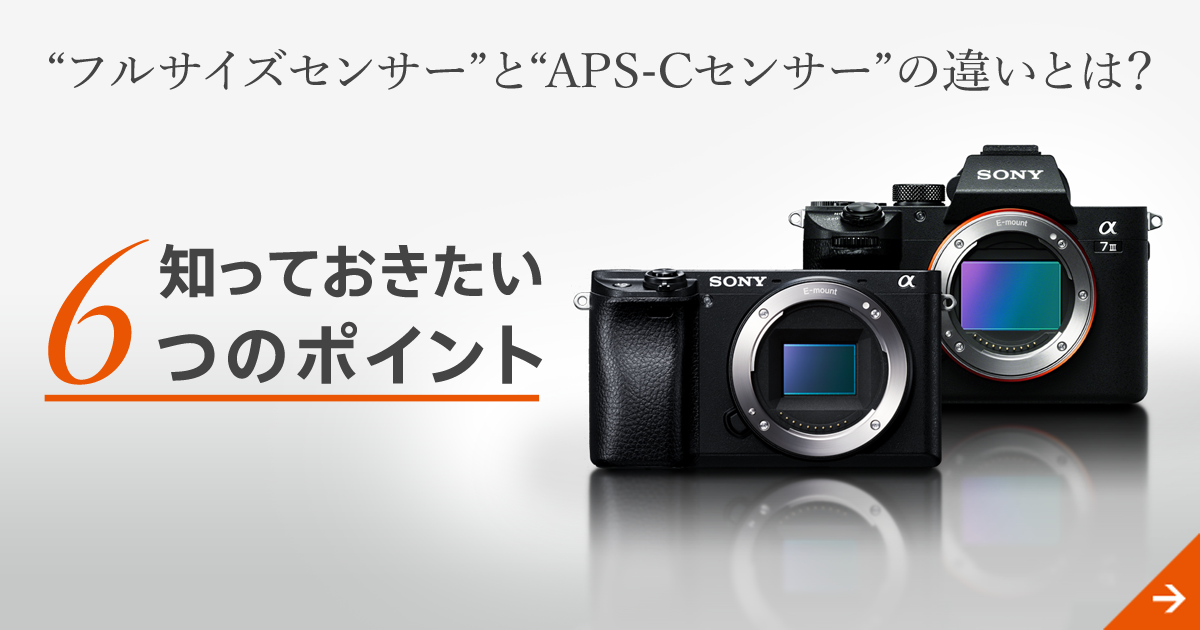
“フルサイズセンサー”と“APS-Cセンサー”の違いとは? 知っておきたい6つのポイント | ソニー
デジタルカメラの目とも言われるイメージセンサー。サイズが異なると、画質だけでなくさまざまな点で違いがあります。「APS-Cセンサー」と「35mmフルサイズセンサー」を比較しながら、それぞれの特徴や違いをご紹介します。
www.sony.jpWhat High-Megapixel Sensors Do in Low Light
Low light is where the limitations of small, high-density pixels show up most clearly. When per-pixel light capture is insufficient, the sensor produces noise in dark areas. Aggressive noise reduction then smooths that noise away — but it also flattens fine texture into a painted, plastic-looking surface. Subjects with low-contrast fine detail — foliage, textured walls, distant signage — tend to suffer most, and the difference is obvious at 100% zoom.
Dynamic range tells a similar story. When a sensor is light-starved, bright light sources blow out easily while shadows crush to black. The result is a photo with contrast but low information — night scenes lose their atmosphere, and the gradations that make a city feel alive get compressed out. Sensors with more light-gathering capacity hold highlight-to-shadow transitions more gracefully.
Night mode processing has become genuinely impressive — multi-frame stacking, AI noise reduction, and pixel binning can rescue scenes that were impossible a few years ago. But processing has a ceiling. When it's working against a fundamental sensor limitation, detail and texture take the hit. High-megapixel sensors excel at resolving fine detail in bright light and holding up under heavy crops, but in low light, sensor size is what determines whether the scene gets recorded faithfully.
💡 Tip
When a night shot looks grainier than expected despite a high megapixel count, the culprit is usually the physics of small pixels, not a lack of resolution. You're seeing the artifacts of compensating for insufficient light, not a failure of the algorithm.
Storage, Transfer, and Editing Overhead
High resolution isn't just a performance question — it's a logistics question. Larger files mean more storage consumption, slower sharing, and heavier editing pipelines. The difference between 12MP and 50MP, 48MP, or 200MP is significant per shot, and it compounds fast. Apple's own documentation puts 12MP ProRAW at around 25MB per file and 48MP ProRAW at roughly 75MB. Shoot a hundred frames on a trip at 48MP RAW and you're looking at 7.5GB before you start culling.
Editing overhead is real too. High-resolution images take longer to load, adjust, and export — on the phone itself and in desktop software. The reason 200MP devices typically shoot in binned 12.5MP by default isn't just low-light performance; it's that 12.5MP is simply far more practical to handle day-to-day. The maximum resolution exists as a mode you invoke for specific needs, not a setting you leave on permanently.
HEIF helps on the storage side. It can achieve comparable quality to JPEG at roughly half the file size, which makes high-megapixel shooting meaningfully more sustainable. Apple's 48MP high-resolution capture uses HEIF to manage that tradeoff. RAW remains the right choice when you need maximum editing latitude — but pairing RAW with 200MP is a commitment to both storage capacity and post-processing time.
Putting this together: high megapixels pay off in bright-light detail and aggressive cropping. They come with real costs in low light, storage, and workflow. The sensor physics and data overhead don't disappear because the number looks impressive. Evaluating a camera honestly means accounting for all three: sensor size, per-pixel light budget, and what it's like to actually use the resulting files.
The Five Specs That Actually Predict Shooting Experience
Sensor Size and Aperture (F-number)
If you rank purchase factors by practical impact, sensor size and aperture (F-number) come first. Megapixels get the headline, but it's the amount of light a camera can collect that determines real-world image quality. Larger sensors have more total light-gathering area. Smaller F-numbers mean brighter lenses. The night-scene differences described earlier trace back to these two variables.
The Xiaomi 12S Ultra puts this in concrete form: a 1-inch-class sensor measuring roughly 13.2 × 8.8mm, with a main camera aperture of F1.9. That's an unusually large capture area for a smartphone, and in practice it means the camera isn't straining against its physics in dim conditions. My experience with 1-inch-class sensors is that they look "effortless" in shadow areas in a way that shows up in the finished image — not because of any single spec, but because the underlying sensor isn't being pushed to its limits.
High-megapixel sensors like the ISOCELL HP1 make a different tradeoff. Samsung rates it at 1/1.22-inch with a 0.64μm pixel pitch. Compared to the IMX989's 1.5μm pixels, individual pixel capture area is significantly smaller, which is why binning is baked into the design. The binning is sensible engineering — it just means the "200MP" figure describes the sensor's ceiling, not its default behavior.
When evaluating a phone in store or online, this sequence cuts through the noise:
- Is the sensor size specified? (1-inch, 1/1.22-inch, 1/1.3-inch, etc.)
- Is the F-number low? (F1.9 is brighter than F2.8)
- Does high-megapixel shooting use binning by default?
- Does the telephoto camera also have a reasonable aperture?
- In sample night shots, do shadows look rendered naturally, or do they look painted?
Wide, Ultrawide, and Telephoto — What the Lens Array Actually Covers
After sensor and aperture, lens configuration is the next most important spec. The relevant question isn't "how many cameras does it have?" but whether it covers the angles you actually use. The whole point of a multi-lens system is to maintain image quality across different shooting distances, not just to increase camera count.
The wide camera handles most daily shooting — meals, people, quick notes, kids' snapshots. Ultrawide is for landscapes, interiors, and situations where you physically can't back up further. Telephoto does more than just reach distant subjects: it lets you stay back and compose naturally, which matters for portraits (compressed facial perspective) and food shots (clean framing without distortion).
Real-world examples: the Samsung Galaxy S23 Ultra carries 200MP wide, 12MP ultrawide, 3× telephoto, and 10× telephoto — an unusually broad coverage range. The Galaxy S24 Ultra shifts toward a 5× optical anchor as the primary telephoto. Google Pixel 8 Pro also offers 5× zoom, which handles a useful mid-to-far range comfortably. The iPhone 15 Pro's 3× optical suits everyday shooting — portraits, food, street scenes — without being overkill for people who don't frequently need long reach.
The right lens array is the one that matches your shooting habits. If you regularly photograph sports, wildlife, or distant subjects at events, telephoto value compounds quickly. If travel landscapes and indoor shots dominate, ultrawide quality and usability will matter more to your satisfaction.
Optical vs. Digital Zoom
Zoom is one of the most commonly misread specs. Optical zoom uses the lens physically to magnify — image quality stays stable. Digital zoom crops the image file and upscales — quality degrades, sometimes quickly. A phone that pairs 3× optical with a periscope telephoto for higher magnifications holds detail at range in a way that digital cropping simply can't match. The practical question: how much of the zoom range is optically covered at the magnifications you'll actually use?
In both store testing and daily shooting, I look at the optical limit before anything else. Miss that number and you can end up with a phone that looks powerful on paper but produces soft, detail-poor images as soon as you exceed the optical range. Telephoto optical reach is one of those specs where the physical optics make a categorical difference, not just an incremental one.
⚠️ Warning
Evaluate zoom by the maximum optical magnification, not the headline total magnification. Buying for a number that's mostly digital zoom leads to disappointment in real use.
OIS, EIS, AF, and Processing Speed
Stabilization belongs above megapixels in your evaluation order. OIS (optical image stabilization) corrects for camera shake mechanically, at the lens or sensor. EIS (electronic image stabilization) stabilizes video digitally. They solve different problems — OIS matters most for stills and low-light shooting; EIS matters most for smooth video, though it usually introduces a slight crop to the frame.
For stills, OIS is the one to check. The Galaxy S23 Ultra, S24 Ultra, Pixel 8 Pro, and Xiaomi 12S Ultra all include it. When shutter speed has to drop in low light or indoors, the presence of OIS directly translates to a higher percentage of usable frames.
AF speed and processing throughput round out this section. A stationary subject gives stabilization plenty of time to work. A moving subject makes focus tracking and shutter latency the limiting factors. At school sports days, I've shot the same scenes with different phones and seen real differences in keeper rates — not from stabilization alone, but from how quickly and reliably each phone locked focus and captured the decisive frame. Fast-moving subjects, whether kids or pets, tend to be limited more by subject blur (caused by motion, not camera shake) than by any other variable. Optical telephoto reach matters here too: getting a clean frame optically at distance beats trying to recover a soft digitally-zoomed crop.
ISP, AI Processing, and Night Mode
A smartphone camera isn't just its sensor and lens. The ISP (image signal processor) and AI processing pipeline are where the final image is actually made. Texture rendering at 100% zoom, HDR tone-mapping, skin rendering, and noise handling in dark scenes all depend on this layer. Phones with similar specs on paper can produce dramatically different images because the processing is doing different things.
Google Pixel 8 Pro's computational photography strength produces consistently well-balanced images — controlled shadows and highlights, structured night scenes. iPhone 15 Pro is designed for both immediate visual quality and editing flexibility, with Apple ProRAW and high-resolution HEIF options that hold up in post-processing. Samsung Galaxy S23 Ultra's high-megapixel system excels at bright-light resolution and cropping headroom, and the processing tuning shapes how that hardware potential is realized.
Night photography is where processing differentiation is most visible. Phones that aggressively lift shadows look impressive but often flatten texture in the process. Phones that retain some noise preserve a more natural, film-like quality. When I evaluate a new phone, I go to night shots before daylight samples. Checking how foliage, textured walls, and text on signs survive at 100% zoom tells me more about ISP generation than any spec number. Night mode quality isn't just about brightness — the balance between brightness and naturalness is the more useful benchmark.
File Format and Storage Planning
The shooting experience doesn't end when you press the shutter. How you store, share, and edit those files has a direct impact on satisfaction — especially as megapixels climb. The three formats to understand are JPEG, HEIF, and RAW.
JPEG is convenient, universally compatible, and ready to share immediately. HEIF delivers comparable quality at roughly half the file size — significant when shooting at 48MP or high-resolution modes. RAW offers the most editing latitude at the cost of substantial file size and workflow overhead.
iPhone 15 Pro supports Apple ProRAW at 12MP or 48MP, with Apple's guidance putting 12MP ProRAW at ~25MB and 48MP at ~75MB per file. Pixel 8 Pro also supports simultaneous RAW capture for users who want to edit carefully. Samsung Galaxy S23 Ultra offers RAW in configurations up to 512GB and 1TB — because at 200MP, storage capacity is a real constraint, not an afterthought. Xiaomi 12S Ultra supports RAW in 256GB and 512GB configurations.
A practical checklist before buying:
- Is JPEG sufficient for your typical output?
- Does the phone support HEIF for storage-efficient high-res shooting?
- Do you actually have a workflow that needs RAW?
- Is the storage capacity adequate for your shooting volume at high resolution?
- Will the file sizes create friction in cloud sync or PC transfer?
- Does your use case need 12MP flexibility, or do you genuinely need 50MP+ cropping headroom?
For social media and daily shooting, 12MP handles most situations without friction. 50MP suits light-to-moderate cropping well. 200MP is a pointed choice for maximum crop flexibility in bright conditions. Looking at format and storage alongside resolution reframes the decision from "which phone has the most megapixels?" to "which phone fits how I actually shoot and manage photos?"
How Many Megapixels Do You Need? A Use-Case Breakdown
Social Media
The numbers here are more grounding than most people expect. Full HD video — the baseline for most social viewing — requires only about 2.07 megapixels. Still photos allow for some zoom on screen, but daily social posts rarely get examined at that level. For most social media use, 12MP output is well above what the platform or the viewer's screen can distinguish.
In this context, chasing higher megapixels often creates problems rather than solving them. Larger files take longer to upload, consume more storage, and require conversion steps that add friction. If social media is your primary output, the relevant question about resolution isn't "is it high enough?" but "is it too heavy to deal with easily?"
💡 Tip
For social-focused shooting, the better question is "is this file too big?" not "are there enough pixels?" Full HD at ~2MP puts 12MP in perspective — there's plenty of headroom for normal use.
A4 Printing
Print adds specificity. A4 at 300dpi requires 2,481×3,507px — about 9 megapixels. For home printing and general high-quality output at A4, 12MP is comfortably over the threshold. Commercial printers sometimes specify 350dpi, but for personal prints at this size, 300dpi is a practical benchmark. You don't need 50MP or 200MP to print well at A4.
When I print family photos at A4, 12MP data consistently delivers results that look sharp and natural. The qualities I notice at that size aren't megapixel-related — they're tonal: how skin gradates, whether highlights are blown, whether shadows retain detail. Exposure and color accuracy influence print satisfaction more than resolution does.
The Pixel 9 Pro class, which outputs around 12.5MP, is well-suited for A4 use. For anyone printing from their phone for albums or framing, 12MP isn't a compromise — it's a practical and sufficient resolution.
Heavy Cropping
This is where high megapixels genuinely earn their place. If you regularly crop significantly after the shot — pulling one dish out of a wide table composition, reframing a landscape, or isolating a detail from a broader scene — starting with more pixels gives you proportionally more flexibility in post. At 50MP, light-to-moderate cropping is very comfortable. I shoot a lot of food photography for editorial use, and 50MP files let me reframe or crop for specific layouts without worrying about having started too wide.
200MP takes that further. The Galaxy S23 Ultra class excels at isolating distant subjects in bright conditions or radically recomposing after capture. The math works out: at 4×4 binning from a 200MP sensor, you get ~12.5MP with good noise performance; in high-res mode, the full pixel grid is available for maximum crop flexibility. That combination is well-suited to the scenario.
The caveat: 200MP isn't universal. High-resolution files carry storage overhead, and low-light performance under the full pixel count is inherently limited by per-pixel physics. Choosing 200MP makes sense when you have a clear need for heavy cropping in good light. For moderate cropping, 50MP is usually the better balance. For minimal or no cropping, 12MP is entirely adequate.
Large-Format Printing and Viewing Distance
Large-format printing doesn't scale linearly from A4 logic. Posters are typically viewed from a distance — not held in hand — so effective resolution requirements drop meaningfully. Around 200dpi is often sufficient for large-format display. The relevant variable isn't print size; it's viewing distance.
This means the jump to ultra-high resolution isn't automatic for large prints. Event posters, retail displays, and trade show banners viewed from several feet away can look excellent from 12MP sources. Up-close exhibition work, where viewers can stand inches from the image, is a different story. Large format is about "how close will people stand?" not "how big is the paper?"
Resolution Class Summary
| Megapixel Class | Best Fit | Strengths | Watch Out For | Key Supporting Specs |
|---|---|---|---|---|
| 12MP | Social media, everyday shooting | Manageable file sizes | Heavy cropping isn't viable | OIS, AI processing |
| 50MP | Daily use + light cropping | Good overall balance | Wide variation between devices | Sensor size, OIS |
| 200MP | Heavy cropping, maximum detail in bright light | Excellent crop flexibility and resolving power | Low-light noise, storage overhead, processing load | Sensor size, processing pipeline, storage capacity |
Reading this table honestly: 12MP is not "low quality" — it's a practical class that handles social media and A4 printing without strain. 50MP offers the best balance for photographers who occasionally reframe or crop. 200MP is a deliberate choice for users who specifically need maximum crop headroom. Following the biggest number on a spec sheet is a reliable way to end up with tradeoffs you didn't account for.
Camera Priorities for Night Scenes, Kids, and Travel
Night Photography
For low-light shooting, the evaluation order should start with how well the camera gathers light without pushing its limits — not megapixels. Sensor size, aperture F-number, OIS, night mode processing, and ISP generation all shape the outcome more than resolution does. Bright-light resolution is where 200MP sensors flex; night scenes reward sensors that can handle photons efficiently.
The contrast is instructive. The Xiaomi 12S Ultra's 1-inch-class 50MP sensor with F1.9 and OIS is built for exactly this scenario. The Galaxy S23 Ultra's 200MP sensor, by contrast, deserves attention in night conditions not for its megapixel count but for its OIS quality, binned-output performance, and noise handling. In low light, the S23 Ultra doesn't run at 200MP — it bins to ~12.5MP to improve light capture. Framing it as "better than 200MP in the dark" is actually the right way to think about it.
I use night mode constantly, and I've had shots where slight hand movement during the exposure made sign lettering double-expose — the image was technically in-focus but the night mode blending produced ghosting. Phones with strong OIS handled the same scenes with higher consistency. Night mode algorithms can be excellent, but they can't fully compensate for movement during a long exposure. That's why hardware stabilization remains essential for low-light shooting.
ℹ️ Note
For night photography, the key questions are "does this camera gather light efficiently?" and "does it control shake well?" — not "how many megapixels does it have?" Sensor size, aperture, OIS, and night mode maturity together predict results better than resolution alone.
ISP generation makes a real difference here. Night images are shaped by how the processor stacks frames, suppresses noise, and preserves color. Pixel 8 Pro and iPhone 15 Pro both demonstrate that well-tuned 50MP and 48MP cameras can outperform higher-megapixel alternatives in low light. A camera that retains shadow detail while controlling highlights produces images that hold up on second look — versus a camera that aggressively brightens everything and flattens texture in the process.
Kids and Pets
Moving subjects put different demands on a camera. What determines keeper rate with kids and pets is autofocus speed, subject tracking, shutter latency, and continuous shooting throughput. The decisive moment — a laugh, a mid-jump, a split-second look — is determined by whether focus was locked and the shutter was released before the moment passed. Resolution is irrelevant if the subject was moving when the shutter fired.
At school events, I've noticed that keeper rate correlates less with overall image quality and more with how reliably the phone stays locked on a face through motion. Some phones produce sharp, well-exposed frames far more consistently than others under the same conditions. The spec sheet doesn't tell you this — you learn it from shooting.
For this use case, Pixel 8 Pro and iPhone 15 Pro tend to outperform higher-megapixel options in practical shooting. The Galaxy S23 Ultra covers a wide range including telephoto, but for fast subjects, "recovering resolution in post" is far less effective than "nailing focus in the first place." A sharp 12MP frame of a kid mid-laugh is worth more than a blurry 200MP frame of the same moment. Optical telephoto reach matters here too — reaching a distant subject optically without digital degradation makes a real difference when you need to stay back and shoot across a field.
Pets present similar challenges with less predictable movement. Accurate subject tracking, fast shutter response, and quick readiness for the next shot matter more than sensor resolution in most pet photography scenarios. My impression: phones that "make the shot happen" feel different from phones that "take a photo when asked." The former set earns its reputation through AF and processing speed, not megapixel count.
Travel Photography
Travel is where lens range has the biggest influence on overall satisfaction. Ultrawide handles architecture, interior spaces, temple grounds, narrow streets — scenes where the full environment is the subject. Telephoto brings distant details closer but also creates flattering compression for portraits and a way to simplify compositions. Mid-distance street subjects often look cleaner through a telephoto than a wide lens at close range.
The travel-specific reframe: "does it have 200MP?" is the wrong question. "Can I shoot the full range of scenes I encounter?" is the right one. The Galaxy S23 Ultra's combination of ultrawide, 3× optical, and 10× optical covers most travel scenarios impressively — distant architecture, stage performances, mountain peaks. The S24 Ultra and Pixel 8 Pro's 5× optical range is practical for a slightly tighter everyday reach, excellent for portraits and mid-distance subjects. iPhone 15 Pro's 3× suits food, street photography, and travel that doesn't demand extreme telephoto reach.
Even with the right focal lengths available, check whether the telephoto camera has OIS. Travel photography frequently involves hand-held shots from fixed positions — you can't always move closer to get a better angle. Optical zoom with stabilization produces results from those positions that pure digital cropping can't match. I regularly shoot building facades, overhead decoration, and distant architectural details at travel destinations, and phones with longer optical reach return reliably sharper images from those positions.
Ultrawide deserves the same attention. Shooting wide just to "fit more in" tends toward busy compositions. Ultrawide earns its keep when the width itself is the subject — a sweeping interior, an open coastline, a long corridor in perspective. Understanding when each focal length serves the scene well is what separates coherent travel photos from a folder full of wide snapshots. Megapixel count rarely comes into it; sensor quality at wide and telephoto, and stabilization at reach, make the real difference.
File Format Deep Dive: How JPEG, HEIF, and RAW Change the High-Megapixel Experience
JPEG: Strengths and Limits
JPEG's core advantage is universal compatibility. Shoot, share to social media, send to family, transfer to a PC, hand off to a print service — JPEG never causes friction in any of those steps. For users who want to capture and distribute photos without managing a post-processing workflow, JPEG's convenience still stands.
That said, the limitations of JPEG become more visible as megapixel counts rise. JPEG is a processed, compressed output — the image decisions are baked in at the time of capture. Pushing exposure or white balance significantly in editing reveals compression artifacts and tonal breakup. A 50MP or 200MP sensor delivers raw information that JPEG doesn't fully preserve for editing headroom.
My practical take: JPEG works well as a capture-and-done format for cameras with strong processing pipelines. Pixel 8 Pro and iPhone 15 Pro both produce JPEG output that looks good out of the camera, making them well-suited for daily documentation and travel without post-processing. The limitation only surfaces when you need to heavily reprocess a specific frame.
HEIF: Efficiency and Caveats
HEIF offers better compression efficiency than JPEG while maintaining comparable visual quality — roughly half the file size under similar conditions. That becomes significant when shooting at 48MP, 50MP, or in high-resolution modes, where per-file overhead accumulates quickly across a shoot. iPhone 15 Pro's 48MP high-resolution mode uses HEIF to keep the file size manageable; the same logic applies across high-megapixel Android devices.
The compounding math matters for travel and events. If you shoot a few hundred frames on a trip, HEIF versus JPEG can mean hundreds of megabytes of difference in your total storage consumption — which also affects cloud sync time, backup duration, and how long you spend waiting at the end of a day.
I found this out the hard way after shooting a trip heavily in 200MP RAW. Returning home, I was looking at not just photo selection but a full pipeline of RAW development, export, and backup before I could do anything with the images. After that, I shifted to HEIF as my travel default and reserve RAW for specific frames that need careful processing. The workflow improvement was immediate.
One caveat: HEIF isn't as universally handled as JPEG. Some platforms, editing applications, and workflows add a step when dealing with HEIF files. For users entirely within Apple's ecosystem, this is essentially invisible. For cross-platform workflows, it's worth testing your specific tools before committing.
💡 Tip
For high-megapixel phones, the question isn't just "how many MP can I capture?" — it's "how many frames at that resolution can I realistically manage?" File format shapes the practical answer as much as the sensor spec does.
RAW: Power and Overhead
RAW preserves the most editing latitude: exposure recovery, white balance adjustment, highlight and shadow control, noise reduction tuning. iPhone 15 Pro's Apple ProRAW works at 12MP or 48MP. Pixel 8 Pro supports simultaneous RAW recording for deliberate shots. Both are genuine tools for photographers who process images carefully.
The overhead is proportional. File size, cloud transfer time, import speed in editing software, and export duration all increase with resolution and format. Shooting 200MP RAW on a device like the Galaxy S23 Ultra compounds this — the files are large, editing is slower, and storage runs out faster. The experience is manageable for a handful of images; it becomes a real workflow constraint at scale.
RAW is the right choice for specific subjects: sunset sequences you want to tune carefully, architectural interiors with challenging light, food photography where color accuracy matters in final delivery. It's not a practical primary format for travel documentation or family shooting at volume. My approach: RAW for the shots I intend to work on; HEIF or JPEG for everything else. Treating RAW as the default for high-volume shooting is a reliable path to spending more time at your desk than you wanted to.
Storage Planning
Across JPEG, HEIF, and RAW, the divergence in storage consumption, transfer speed, and editing overhead becomes more pronounced as megapixel counts rise. 12MP files are forgiving on all three axes. 48MP, 50MP, and 200MP files demand planning.
Samsung's Galaxy S23 Ultra and S24 Ultra are available in 256GB and higher configurations — S23 Ultra reaches 512GB and 1TB. That capacity matters not just for video-heavy users but for anyone shooting high-resolution stills frequently, mixing RAW with standard capture, or both. The same logic applies to iPhone's HEIF Max mode and Android high-resolution modes: storage capacity is part of the camera system, not an afterthought.
For regular travel and event shooting, HEIF compatibility should be a deliberate check. At 50MP and above, HEIF changes the daily experience — you stop monitoring storage during a shoot. For 200MP RAW use, 256GB is a practical minimum; more is better. The flagship camera experience is only as good as the storage and workflow you build around it.
High-megapixel sensors dominate spec sheets, but day-to-day usability turns on format, capacity, and the friction involved in getting images off the device and into the places you want them.
The Bottom Line: Megapixels Should Be the Last Thing You Compare
Megapixels work best as the final tiebreaker, not the starting point for phone camera selection. Start with your use case. Work through sensor size, aperture, OIS, optical zoom range, and file format. If two options are otherwise equal for your needs, then resolution is worth weighing. Even with relatively modest 12MP-class cameras, I've come away from shoots with images I genuinely wanted to keep — night scenes, portraits, candid moments where the camera's processing and optics delivered something I cared about. Spec sheet rankings matter less than whether the camera fits how you shoot.
Related Articles
iPhone 16 Pro Review: How Camera Control Changed the Way I Shoot
iPhone 16 Pro Review: How Camera Control Changed the Way I Shoot
A hands-on review of the Apple iPhone 16 Pro after two weeks of daily use. We put the new Camera Control button, A18 Pro chip performance, and battery life to the test.
Smartphone Buying Guide: How to Choose Without Regrets
Smartphone Buying Guide: How to Choose Without Regrets
Buying a smartphone isn't about picking the most expensive model. Getting the fundamentals right — OS, price range, specs, and carrier or SIM compatibility — dramatically reduces the risk of a bad purchase. Today's mid-range phones have enough performance for everyday use.
How to Choose a Smartphone: A Complete Beginner's Guide
How to Choose a Smartphone: A Complete Beginner's Guide
A practical guide for first-time smartphone buyers covering use cases, iPhone vs. Android differences, budget tiers, screen size, key features, and post-purchase setup — helping you narrow down your options in about three minutes.
7 iPhone & Android Battery Settings That Actually Work
7 iPhone & Android Battery Settings That Actually Work
Before you replace your phone, battery life can often be meaningfully improved through settings alone. This guide covers 7 settings for iPhone and Android users — ranked by priority — that reduce daily drain and protect long-term battery health.